
Migrate to Shopify when staying costs more than moving: in hosting and developer bills, in hours your team spends on workarounds, and in sales a better checkout would close. If none of that is true, a new platform won’t fix what’s bothering you.
In this article
What are the signs it’s time to migrate to Shopify?
If you recognize two or more of these, the cost of staying is probably higher than it looks.
| Sign | What it looks like day to day |
|---|---|
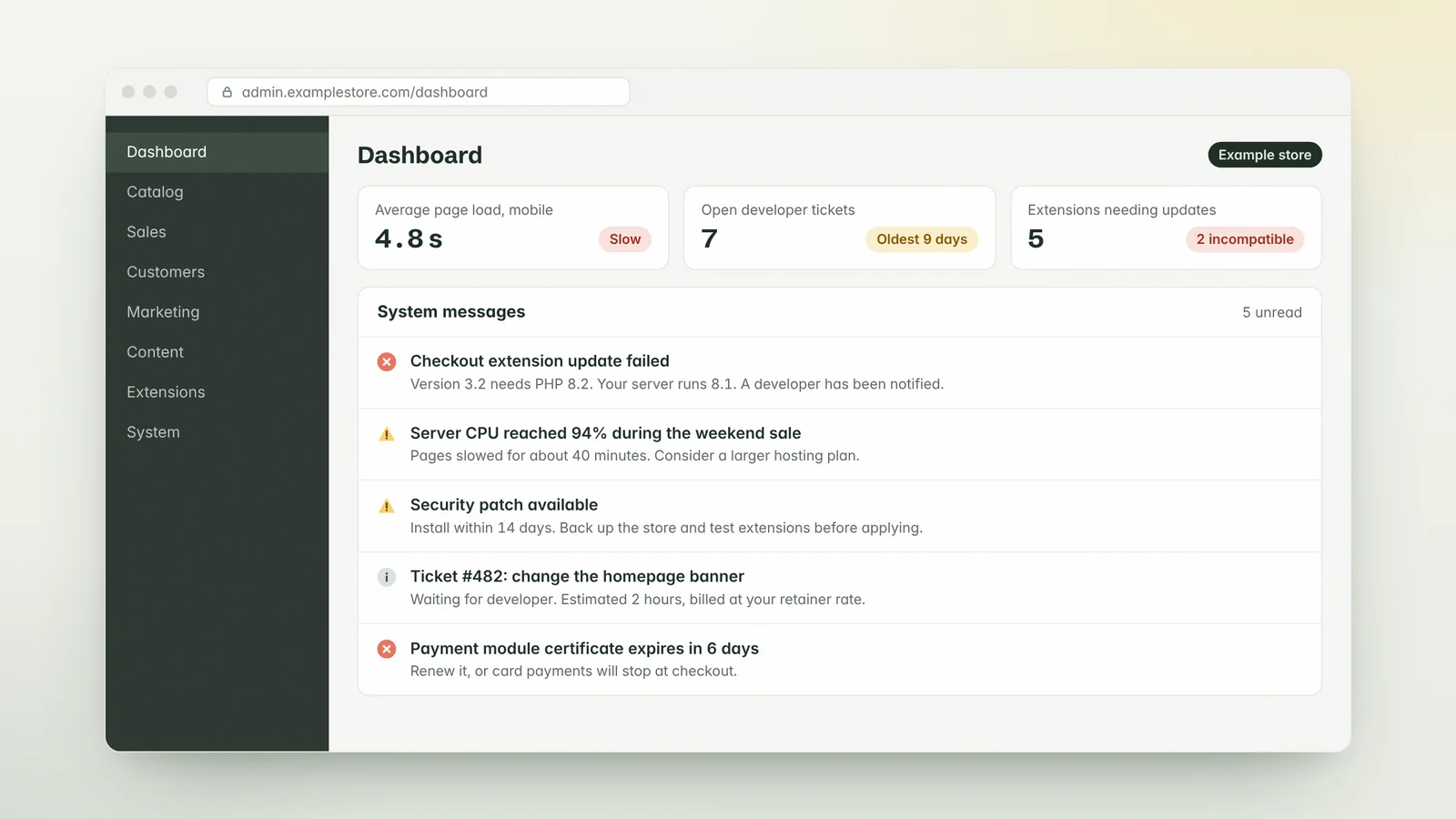
| The platform needs constant upkeep | Hosting, patches and a developer retainer arrive as bills every month, and one update can break an extension until a developer is free |
| Small changes need a developer | Every banner, landing page or menu change becomes a ticket and an invoice |
| Sales are flat while spend rises | Ad and SEO budgets go up and revenue doesn’t, while mobile visitors drop out between cart and payment |
| The checkout feels dated | Abandoned carts keep climbing, there’s no fast wallet checkout, and you can’t test or change the steps |
| The tools are falling behind | Competitors add channels and features faster, and your platform has few current apps and no built-in AI for writing, reporting or admin work |
| The platform’s future is uncertain | Prices rise, ownership changes, updates slow down, and fewer developers know the platform |
| Online and in-store don’t match | Products, stock and customers live in two systems reconciled by hand, so you oversell or miss sales |
When is moving to Shopify the wrong call, or the wrong time?
A move costs money, attention and a few weeks of risk. These are the cases where we’d tell you to wait or look elsewhere.
- The real problem is traffic, not the store. Check your analytics before blaming the platform. If conversion rate is steady and visits are falling, a new store won’t bring visitors back; marketing will. If visits are steady and conversion is falling, the platform may well be part of it.
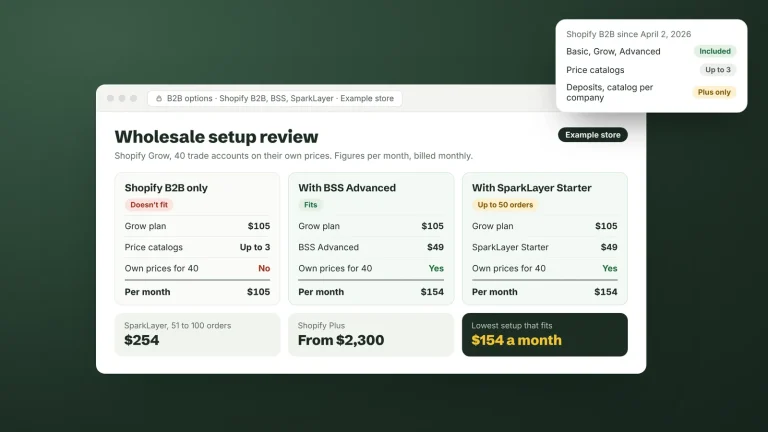
- Your business depends on something Shopify does poorly. Shopify allows up to 2,048 variants and 3 options per product, though it notes that some themes and apps don’t support more than 100. Made-to-order products with many choices, quote-based selling or unusual pricing rules often need apps, and sometimes a lot of them. B2B now comes with the Basic, Grow and Advanced plans, with up to 3 active price catalogs; deposits, partial payments and catalogs assigned directly to specific company locations need Plus. Changes inside the checkout steps themselves, such as app extensions on the shipping and payment steps, also need Plus.
- Some products are restricted by Shopify Payments. That means a third-party payment provider and an extra fee on every order. Find out before you commit, not after.
- Your busy season is close. A launch needs a quiet stretch afterward to fix what testing missed. For most US retailers that means launching well before October, or waiting until the new year.
- You’re in the middle of another big change. A new ERP, a warehouse move or a rebrand at the same time as a replatform doubles what can go wrong on launch day.
- Nobody inside can own it. Someone on your side has to decide what data to keep, check test orders and sign off on redirects. An agency can do the work, but it can’t decide what your business wants to keep.
- You’re locked into a contract. Check notice periods with your current platform, host and payment processor, so you don’t pay for both for months.
How should you decide? Seven steps
This is the order we walk clients through. It takes a few working sessions, and the answer is sometimes “not yet”.
- Write down what isn’t working. Put a number on each.
- OwnerLast year’s spend on hosting, developers and platform fees, and the sales you think you’re missing.
- ManagerConversion rate by device, checkout drop-off, site speed, and the hours your team spends on workarounds each week.
- List what the store must keep doing. These are the things that would stop the business if they broke: B2B pricing, subscriptions, marketplaces, product options, custom fields, integrations with accounting, ERP, shipping and email, reviews, loyalty, and the reports you use every week.
- Check each must-have against Shopify. Mark each one as built in, needs an app (name it and its monthly cost), or not possible today. One must-have Shopify can’t do is reason to stop.
- Compare the cost of staying with the cost of moving. The next section shows what to count.
- Decide what data comes with you. How many years of orders, which customers, which reviews and blog posts. Moving less is usually better: old test orders, duplicate customers and dead products don’t need a new home.
- Pick the timing and the way to move. Your quietest months, and one of the five options further down.
- Agree who decides what.
- OwnerBudget and launch date.
- ManagerData rules, testing and the redirect list.
What does staying cost compared with moving?
Compare both sides over two or three years, not one month. Staying has costs that never show up as a single invoice, and moving has a one-time cost that pays back over time or doesn’t.
| Cost | If you stay | If you move to Shopify |
|---|---|---|
| Platform and hosting | License, hosting, security patches, PCI scans | Your Shopify plan, from $29 to $299 a month billed yearly, or from $2,300 on Plus. Hosting, SSL and PCI DSS Level 1 compliance are included. |
| Developer time | Retainer, upgrades, fixes after updates | Theme and app changes. Less upkeep, but not zero. |
| Apps and extensions | Extension licenses and renewals | Monthly app subscriptions. Price the ones on your must-have list, not a wish list. |
| Payment fees | Your current processor’s rates | Shopify Payments online rates run from 2.9% + 30¢ on Basic to 2.5% + 30¢ on Advanced. Another processor adds 2%, 1% or 0.6% per order, by plan. |
| Your team’s time | Hours spent on workarounds every week | Hours learning the new admin in the first few months |
| Lost sales | Checkout drop-off, downtime, features you can’t offer | Shopify says Shop Pay lifts conversions by up to 50% compared with guest checkout, based on a 2023 study it commissioned. Treat it as a ceiling, not a forecast. |
| The move itself | None | Migration tool or agency, theme, redirects and testing, paid once |
Which Shopify plan would you be on?
| Plan | Monthly | Yearly | Online rate | Third-party fee | Staff |
|---|---|---|---|---|---|
| Basic | $39 | $29 | 2.9% + 30¢ | 2% | Owner only |
| Grow | $105 | $79 | 2.7% + 30¢ | 1% | 5 |
| Advanced | $399 | $299 | 2.5% + 30¢ | 0.6% | 15 |
| Plus | From $2,300 | 3-year term | 2.25% + 30¢ | 0.2% | Unlimited |
Most stores with a small team land on Grow. Advanced starts to pay for itself at higher volume, where its lower card rate covers the price difference. Plus is for B2B with deposits, changes inside the checkout, several storefronts or more than 10 locations.
All four include hosting, Shopify’s checkout with Shop Pay, in-person selling with Shopify POS, and Sidekick, the AI assistant in the admin that writes product descriptions, builds automations and answers questions about your store data. Basic, Grow and Advanced allow 10 locations; Plus allows 200. Agentic, a newer plan with no monthly fee, only sells your products inside AI chats and has no online store, so it isn’t a home for a store that’s moving its website. Starter and Retail are closed to new stores.
One store’s numbers
Take the Magento 2 store in the image at the top: 4,200 products, one developer on retainer, and a small team running it.
| Per year | Staying on Magento 2 | On Shopify Grow |
|---|---|---|
| Platform, hosting and security | $7,200 | $948 |
| Developer retainer and fixes | $18,000 | $4,800 |
| Extensions and apps | $2,400 | $3,600 |
| Total | $27,600 | $9,348 |
The store would spend $18,252 a year less on Shopify, so a $20,000 move pays for itself in about 13 months. Apps cost more than the old extensions did; the savings come from hosting and developer time. Payment fees stayed out of the sum because they were close on both sides, and so did lost sales, because the store couldn’t measure them. If you can measure yours, add them.
What do Shopify migration tools copy, and what still needs a decision?
Every Shopify migration tool copies records from one database to another. The problems after launch rarely come from copying. They come from decisions nobody made: which old links to catch, what to leave behind, how custom data should show on the new store.
| Decision | What the tools do | Why it needs a person |
|---|---|---|
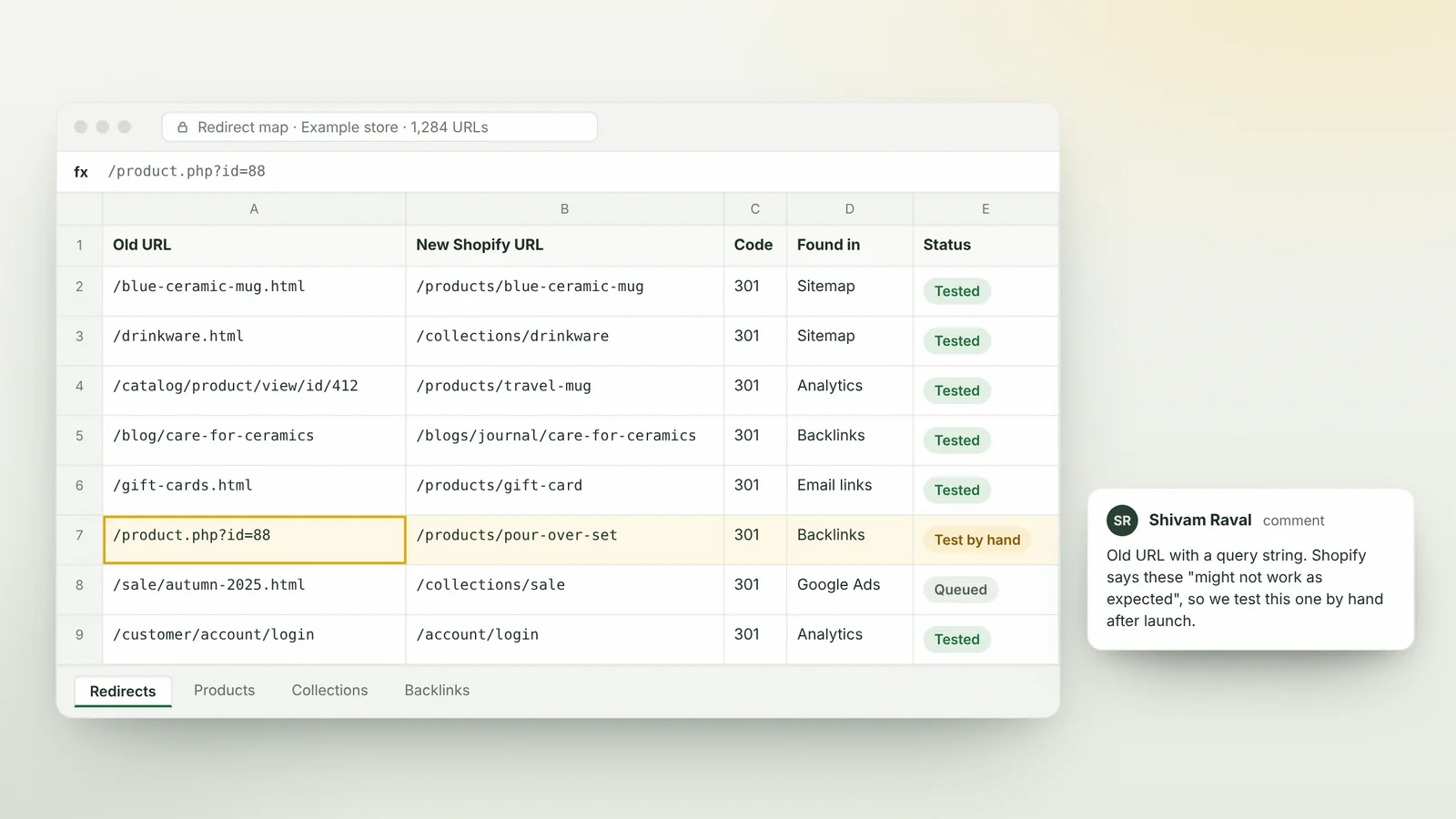
| 301 redirects for every old URL | Some, often paid Some tools create redirects for product and category pages. Shopify’s free app doesn’t. | Shopify uses fixed URL patterns such as /products/ and /collections/, so almost every URL changes. Old links also live in emails, ads, backlinks and analytics. Shopify warns that redirects from URLs with query strings “might not work as expected”, so each one needs testing. A store can hold up to 100,000 redirects, or 20 million on Plus. |
| Links inside descriptions and posts | Not covered No tool says it rewrites them | Google’s site-move guidance says to update internal links to the new URLs rather than lean on redirects. |
| Custom fields | Copied, unfinished Moved into Shopify metafields, but without definitions | Without definitions, the data doesn’t show on product pages and can’t power filters. Someone has to define each field, place it in the theme and set up filters. |
| How much order history to import | All, or paid partial All of it, unless you pay for a partial import | Shopify emails staff a new-order notification for every imported order unless notifications are off first. Marketing apps and automations can fire on old orders too. |
| Data you don’t want | Not cleaned You choose which types of data move. None of the tools clean it. | Test orders, duplicate customers and discontinued products move with everything else unless someone removes them first. |
| Order numbers | Some, for a fee Some tools keep your old numbers | New Shopify orders start from #1001 and can take a prefix. Without a plan, old and new orders can share numbers. |
| Products over Shopify’s limits | Stopped or skipped Tools stop at the limit or skip the product | Products over those limits have to be restructured, with your approval. Kits can become Shopify Bundles. |
| Images and files in descriptions | Images, as an option Some tools move description images. Linked PDFs and size charts aren’t mentioned. | Someone has to check every description for broken images and files after import. |
| Customer passwords | Not possible No tool can move them | Customers sign in with a one-time code by email, so nobody needs a reset email, but they should hear about the change. |
| Google Shopping history | Not covered | Google tracks each product’s performance by its ID. If the ID changes, that history is overwritten, so the feed needs planning if you run Shopping ads. |
| Email platform flows | Not covered | Klaviyo says contacts added to a list can trigger that list’s flows, so list-triggered flows should be paused during the move. |
| Duplicate or blank SKUs | Copied as they are Shopify only warns | Stock, accounting and shipping tools match products by SKU. Clean them before connecting anything. |
| Subscriptions | Not covered Not handled by store tools | Saved cards stay with your payment processor. Plan this with your subscription app before launch. |
A tool is enough when few of these apply to your store. When many do, someone has to own the decisions, whether that’s your team or an agency.
What are your options for migrating to Shopify?
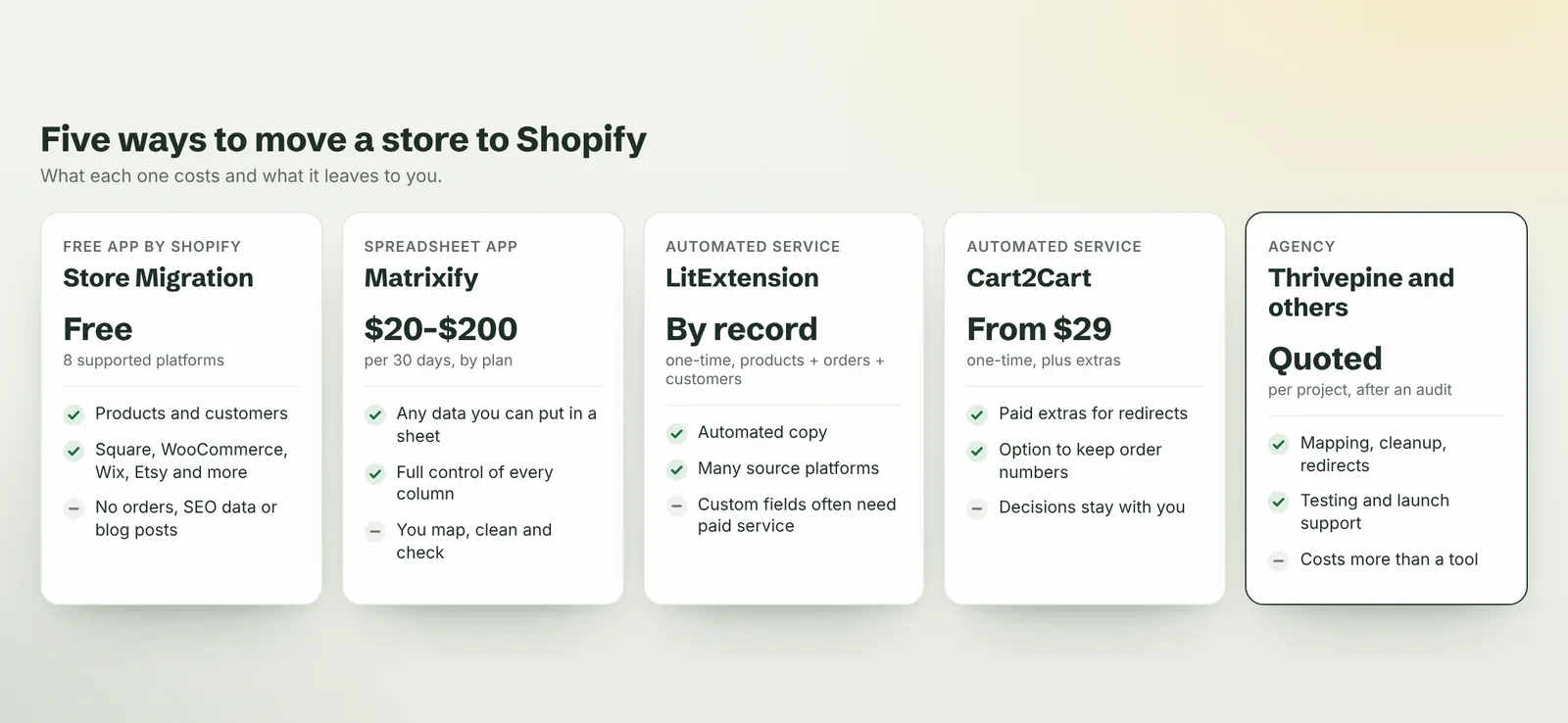
There are five realistic ways to migrate a store to Shopify.
| Option | What it costs | Best for | What it leaves to you |
|---|---|---|---|
| Shopify’s Store Migration app | Free | Straightforward catalogs on Square, WooCommerce, Etsy, Wix, Amazon, eBay, Clover (in early access) or Lightspeed R/X (formerly Vend) | Orders and order history, collections, menus, SEO data, blog posts and pages, reviews, and apps don’t move |
| Matrixify | $20, $50 or $200 per 30 days | Teams comfortable in spreadsheets who want full control. Basic allows 5,000 products but only 1,000 orders and 2,000 customers per job, so most stores with order history need Big ($50). | Mapping, cleanup and checking are yours; you prepare and review every sheet |
| LitExtension | One-time, priced by the number of products, orders, customers and posts | Large record counts from many platforms, with less hands-on work | The decisions above; custom fields and extras often mean their paid service |
| Cart2Cart | One-time, from $29, with paid extras such as 301 redirects and keeping order numbers | Straightforward stores where the paid extras cover what you need | The decisions above, and checking the result |
| An agency, such as Thrivepine | Quoted per project; published ranges run from $8,000 to $50,000 for a mid-size store | Stores with custom data, integrations, search traffic to protect, or nobody in-house to own it | Your sign-off on decisions; the agency does the mapping, cleanup, redirects, testing and launch |
For a sense of scale, a do-it-yourself move with Matrixify can cost a month or two of its Big plan ($50 per 30 days) plus your team’s time. An agency’s price follows the decisions list, so ask for a fixed quote after an audit of your store.
How to choose
- Your platform is on the free app’s list, the catalog is straightforward, and you don’t need order history or search rankings carried over: start with the free app.
- You like spreadsheets and have time to check every row: Matrixify.
- You have lots of records and want the copying automated: LitExtension or Cart2Cart, and budget for the paid options you’ll need.
- More than a few rows of the decisions table apply to you: an agency, or a tool plus someone on your team who owns every decision.
Plenty of stores move well with a tool alone. If yours is one of them, we’ll tell you.
Coming from a specific platform? Our pages on Magento to Shopify, WooCommerce to Shopify, Volusion to Shopify, Shift4Shop to Shopify and Neto to Shopify migration cover what’s different about each.
Not sure which option fits?
Tell us your platform, product count and must-haves. We’ll tell you which option we’d pick and why, within one business day.
When should you migrate, and how long does a Shopify migration take?
The best time to launch on Shopify is right after your busiest season, so the new store has months of normal sales to settle in. For most US retailers that means planning in January or February and launching by late spring or summer. Avoid launching between October and December, or in the weeks before a big promotion or product drop.
How long a Shopify migration takes, and what it costs
The time and cost of a migration to Shopify depend mostly on how much custom data and integration work your store has. Ringly’s 2026 guides to migration cost and timelines put the usual ranges like this, before your Shopify plan and apps:
| Store | Typical timeline | Typical cost of the move |
|---|---|---|
| Small: under 500 products, a ready-made theme, few apps | 2 to 4 weeks | $0 to $300 doing it yourself with the free app, or $1,500 to $8,000 with a freelancer |
| Mid-size: 500 to 5,000 products, custom design, a few integrations | 4 to 8 weeks; 8 to 16 with a fully custom design or Plus | $50 to $1,000 in tool fees doing it yourself, or $8,000 to $50,000 with a full-service agency |
| Large: 10,000+ products, ERP or CRM, B2B or several stores | 3 to 6 months | $25,000 to $250,000+ with a Shopify Plus partner |
The example store at the top of this article, a Magento 2 store with 4,200 products and a $20,000 move, sits in the middle row. For a fixed figure, we quote after a short look at your catalog and integrations. Every project runs through the same five phases, and each one ends with a sign-off.
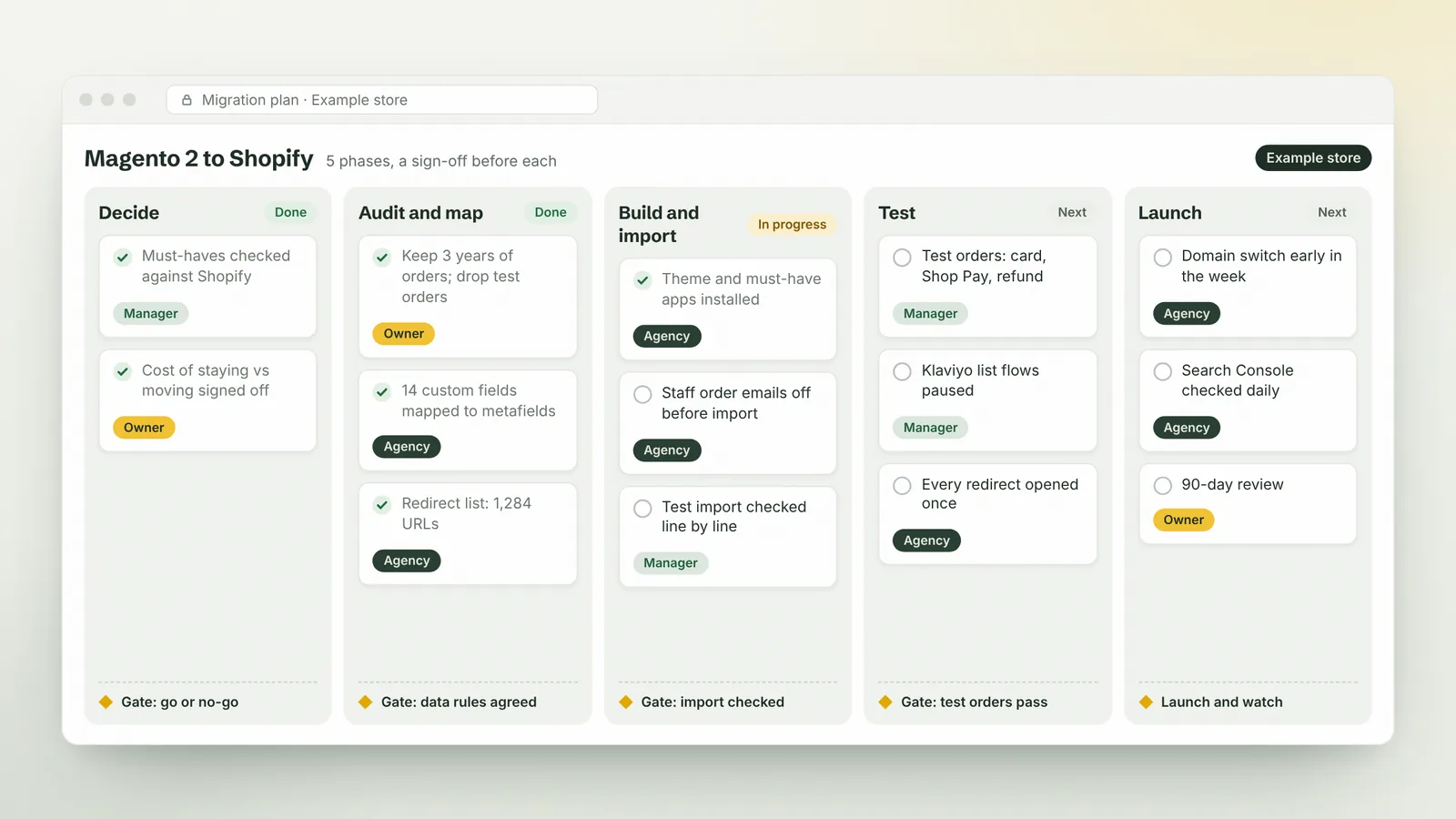
Our free Shopify migration checklist lists every task in these phases, in the order we work through them.
- Launch early in the week, when your team and developers are on hand to fix anything the first orders turn up. Never on a Friday or the day before a sale.
- Freeze changes on the old store a few days before launch, so nothing is added after the final import.
- Watch the first 90 days, not just launch day. Check Search Console for missing pages, compare daily sales with last year, and look at which redirects are being used. Google says rankings can fluctuate for a while during a site move, so a short dip isn’t a reason to panic.
Also selling in a physical store?
If you run a shop counter as well as a website, the move doesn’t have to stop at the online store. Shopify POS runs your in-store checkout from the same products, stock and customer list, so a sale in the shop updates the website straight away and a customer’s online orders show up at the counter.
That makes Shopify one system for both, instead of two you reconcile by hand. Whether to move the shop at the same time, before or after the website is its own decision. We cover it in When to switch to Shopify POS, and your options.
Questions owners ask about migrating to Shopify
How much does a migration to Shopify cost?
Two parts. The running cost is your Shopify plan ($29, $79 or $299 a month billed yearly, or from $2,300 a month on Plus) plus apps. The cost of the move depends on the route: Shopify’s Store Migration app is free; Matrixify is a subscription while you use it, $20 to $200 per 30 days; LitExtension and Cart2Cart (from $29) charge once, priced by how many records you move; an agency quotes per project, with published ranges of $8,000 to $50,000 for a mid-size store. Shopify currently offers 3 days free, then 3 months for $1 a month, which covers much of the build.
How long does a Shopify migration take?
Typically 2 to 4 weeks for a small store on a ready-made theme, 4 to 8 weeks for a mid-size store (longer with a fully custom design), and 3 to 6 months for a large store with an ERP, B2B or several storefronts. Plan the launch for your quietest months, never October to December.
Will migrating to Shopify hurt our Google rankings?
Not if every old URL redirects to its new page with a 301 and internal links are updated. Shopify’s URL patterns are fixed, so almost every URL changes, and Google says rankings can fluctuate during a site move. Most of the risk is in the redirect list, which is why we test it by hand.
Will our store go down during the migration?
It shouldn’t. The Shopify store is built and tested while your current store keeps selling. At launch you point your domain to Shopify, and Shopify says it can take up to 48 hours for the domain to be fully live, though it’s usually much quicker. Freeze edits on the old store for the last few days and copy across any orders placed during the switch.
Can we keep our current design?
Not as files. Themes don’t transfer between platforms, so the design is rebuilt on a Shopify theme. You can recreate the current look closely, or start from a Shopify theme and bring across your brand: colors, fonts, photography and page layout. Many stores use the move to fix what the old design got wrong on mobile.
What data can you migrate to Shopify?
Products with their variants and images, customers, orders, pages, blog posts and URL redirects can all move with the right tool. Customer passwords can’t. Reviews usually move through your review app’s own import, and custom fields arrive as metafields that need setting up.
Can customers keep their passwords?
No tool can move passwords. Customers sign in to Shopify with a one-time code sent by email, so nobody needs to reset anything, but tell them about the change.
Can we keep our order history?
Yes with Matrixify, LitExtension, Cart2Cart or an agency. Shopify’s free app doesn’t move orders. Turn off staff order notifications before importing, or your team gets an email for every old order.
Do we need Shopify Plus?
Most stores don’t. Plus matters when you need changes inside the checkout steps, more than 3 B2B price catalogs, deposits and partial payments, or more than 10 store locations. It starts at $2,300 a month on a 3-year term.
Sources
- Shopify pricing and PCI DSS compliance
- Shopify Help: Sidekick and Sidekick pricing and features
- Shopify blog: Shop Pay checkout
- Shopify Help: customizing checkout and B2B features by plan
- Shopify App Store: Store Migration and Shopify’s post on the app
- Matrixify pricing, LitExtension pricing, Cart2Cart WooCommerce to Shopify options
- Shopify Help: variants, URL redirects, migrating to Shopify
- Shopify Help: custom data, filters, Shopify Bundles, SKUs
- Ringly: Shopify migration cost in 2026 and Shopify migration timeline
- Shopify Help: connecting a domain
- Google: site moves with URL changes and Merchant Center product IDs
- Klaviyo: list-triggered flows