
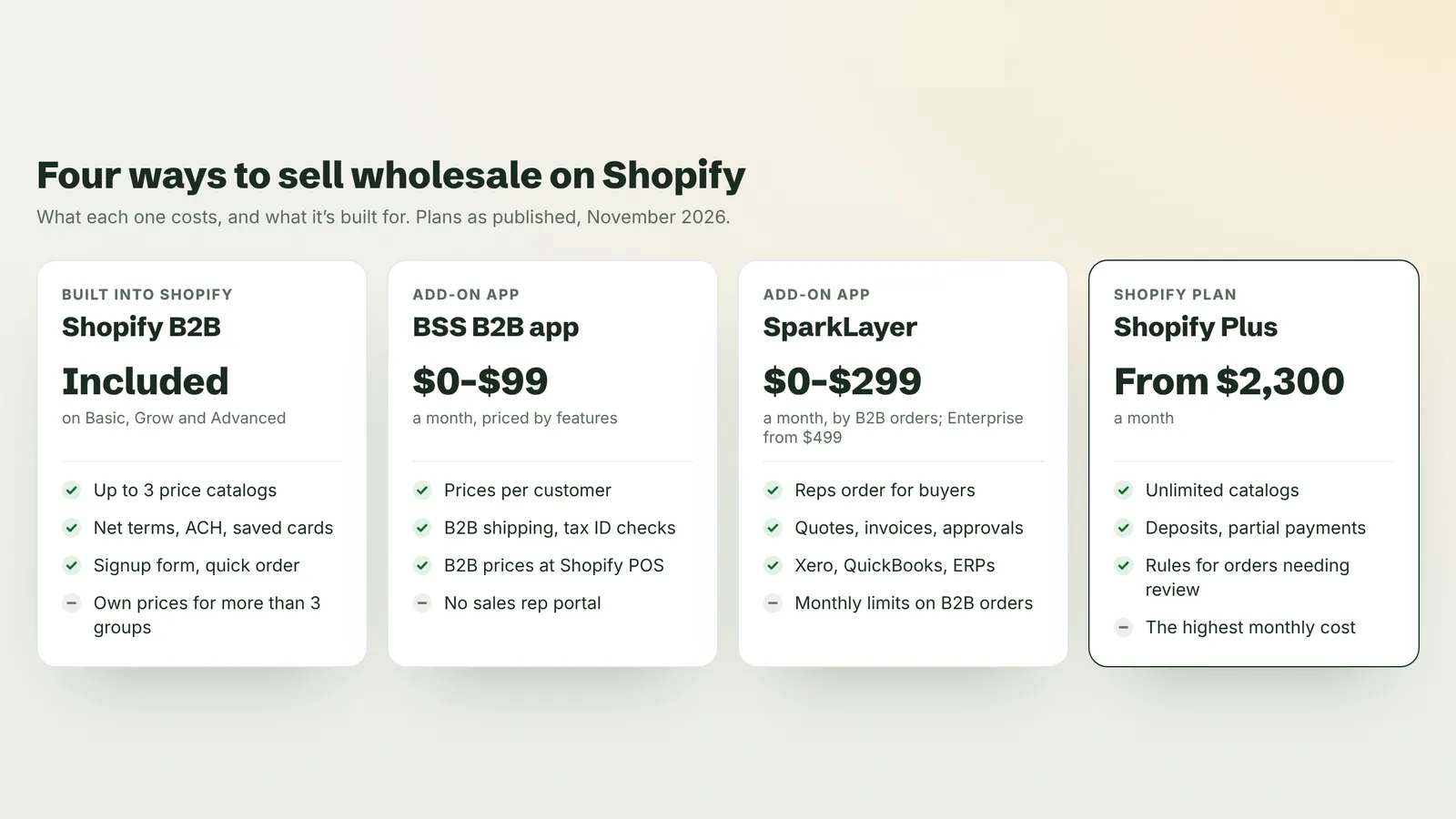
Since April 2, 2026, Shopify’s own B2B features come with the Basic, Grow and Advanced plans, not only Shopify Plus, so most wholesale stores can start without a paid app: up to three price catalogs, volume pricing, net terms and quick reordering are built in, and Shopify’s free Forms and Checkout Blocks apps add a signup form and a minimum order value. Add BSS Commerce’s B2B app, free to $99 a month, when the gaps are pricing and signup rules such as prices per customer, B2B-only shipping or B2B prices at POS. Choose SparkLayer, free to $299 a month with monthly order limits (Enterprise from $499), when sales reps, quotes, invoices or a Xero or QuickBooks connection run your wholesale. Move to Shopify Plus for deposits or a catalog for every company.
In this article
What is Shopify B2B, and how does selling wholesale on Shopify work?
Shopify B2B is Shopify’s built-in way to sell wholesale. Shopify describes it as “a suite of native features that lets you sell business-to-business (B2B) through the Shopify admin and online store.” Trade buyers log in to your store, see the products, prices and quantity rules you’ve set for them, and order through Shopify’s checkout, paying by card or on payment terms. It’s included at no extra cost on the Basic, Grow, Advanced and Plus plans, but not on Starter or Retail.
Five terms come up in every Shopify B2B setup:
- Company. The business you sell to. The people who order for it are customers in your admin, each with ordering or admin rights for the locations they buy for.
- Company location. A branch, store or site the company orders for. Each location has its own addresses, tax settings, catalogs and payment terms.
- Catalog. The products and prices a location can see, with volume pricing (also called bulk or tiered pricing) and minimum, maximum and increment rules for each variant. Below Plus, catalogs are assigned through B2B markets.
- Payment terms. When an order is due: Net 7 to Net 90, or on fulfillment. A fixed due date can be set on an individual draft order.
- Customer accounts. How buyers log in. B2B needs Shopify’s current customer accounts; the legacy version can’t be used for B2B.
B2B or wholesale? Here they mean the same thing. Shopify’s older tool, the Plus-only Wholesale channel, was retired in 2024, and Shopify asked everyone using it to move to B2B on Shopify. Until April 2, 2026, B2B was Plus-only too, so guides written before then say wholesale on Shopify needs Plus or an app. That’s no longer the case: the core features now come with Basic, Grow and Advanced.
One store or two? You can sell wholesale and retail from one store, which Shopify calls a blended store, or run a separate B2B-only store. A blended store shares products, inventory, apps and staff, but it can’t be closed to the public. A dedicated store can be gated to B2B buyers, but it’s a second Shopify store, so apps and integrations are set up and paid for again. Shopify warns the choice is “not easy to change at a later time.”
Which Shopify B2B features come with each plan, including Plus?
Basic, Grow and Advanced get the same core B2B features. Grow adds sales staff permissions, Advanced adds a B2B storefront and checkout set by market, and Plus removes the three-catalog limit and adds catalogs for each company, deposits and partial payments. According to Shopify’s B2B features by plan page, every plan with B2B includes:
- Companies and locations. With buyer permissions for each location: ordering only, or location admin.
- Catalogs. With volume pricing and minimum, maximum and increment rules for each variant.
- Payments. Net terms with payment reminders, ACH in the US and saved credit cards.
- Ordering. Draft orders sent as invoices, checkout to draft for your review, easy reorders and PO numbers.
- Storefront. The free Trade theme and a quick order list.
- Automation. Shopify Flow with B2B data.
| Plan | Per month | B2B catalogs | What it adds |
|---|---|---|---|
| Basic | $39, or $29 billed yearly | 3 active assignments | Every core feature above |
| Grow | $105, or $79 billed yearly | 3 active assignments | Sales staff permissions |
| Advanced | $399, or $299 billed yearly | 3 active assignments | B2B storefront and checkout set by market |
| Plus | From $2,300 | Unlimited, and catalogs for each company or location | Deposits, partial payments, payment requests for each fulfillment, and rules for which B2B orders need your review |
The three catalog assignments are counted across your active B2B markets, so one catalog used in two markets counts twice, and three catalogs in one market use the whole allowance. Three tiers, say trade, distributor and key accounts, fit. Forty accounts on their own negotiated prices don’t.
Also free, outside the B2B feature list
- A wholesale signup form. The company account request form in Shopify’s free Forms app, with an approval step.
- A minimum or maximum order value. Since April 13, 2026, Shopify’s free Checkout Blocks app can set order value limits on Basic, Grow and Advanced, for all customers or only B2B companies. The limit is checked at checkout, whatever the payment method.
- Tax IDs and exemptions. Set for each company location. With Shopify Tax, EU and UK VAT numbers on a company location are validated automatically.
- B2B discounts. On by default for new B2B stores since June 2026, and you can limit a discount to B2B buyers through their market.
Before you start: requirements and limits
- New Shopify Markets. On Basic, Grow and Advanced, B2B catalogs only work if your store uses the new version of Markets.
- No express checkouts. Shop Pay, Apple Pay, Google Pay and Amazon Pay don’t work for B2B orders.
- Features that don’t work with B2B. Local delivery, pickup points, tipping and subscriptions. Pickup in store and abandoned checkouts are off by default, and gift cards at B2B checkout need Shopify Plus and a request to Support.
- Size limits. Up to 500 line items an order. A company can have up to 10,000 locations, each with up to 50 customers and 25 catalogs.
- Currencies and fees. Selling to B2B buyers in several currencies needs Shopify Payments, and without it Shopify’s third-party transaction fees apply, from 2% on Basic to 0.6% on Advanced. B2B and D2C orders can carry different variable platform fee rates; Shopify gives them through Support.
- Other apps. Some third-party apps don’t work with B2B, so check with each app’s developer.
If everything you need is in this section, Shopify B2B on its own is enough, and it’s one less app and monthly fee to manage. If not, the next section shows which app covers what’s missing.
When do you need a Shopify wholesale app like BSS or SparkLayer?
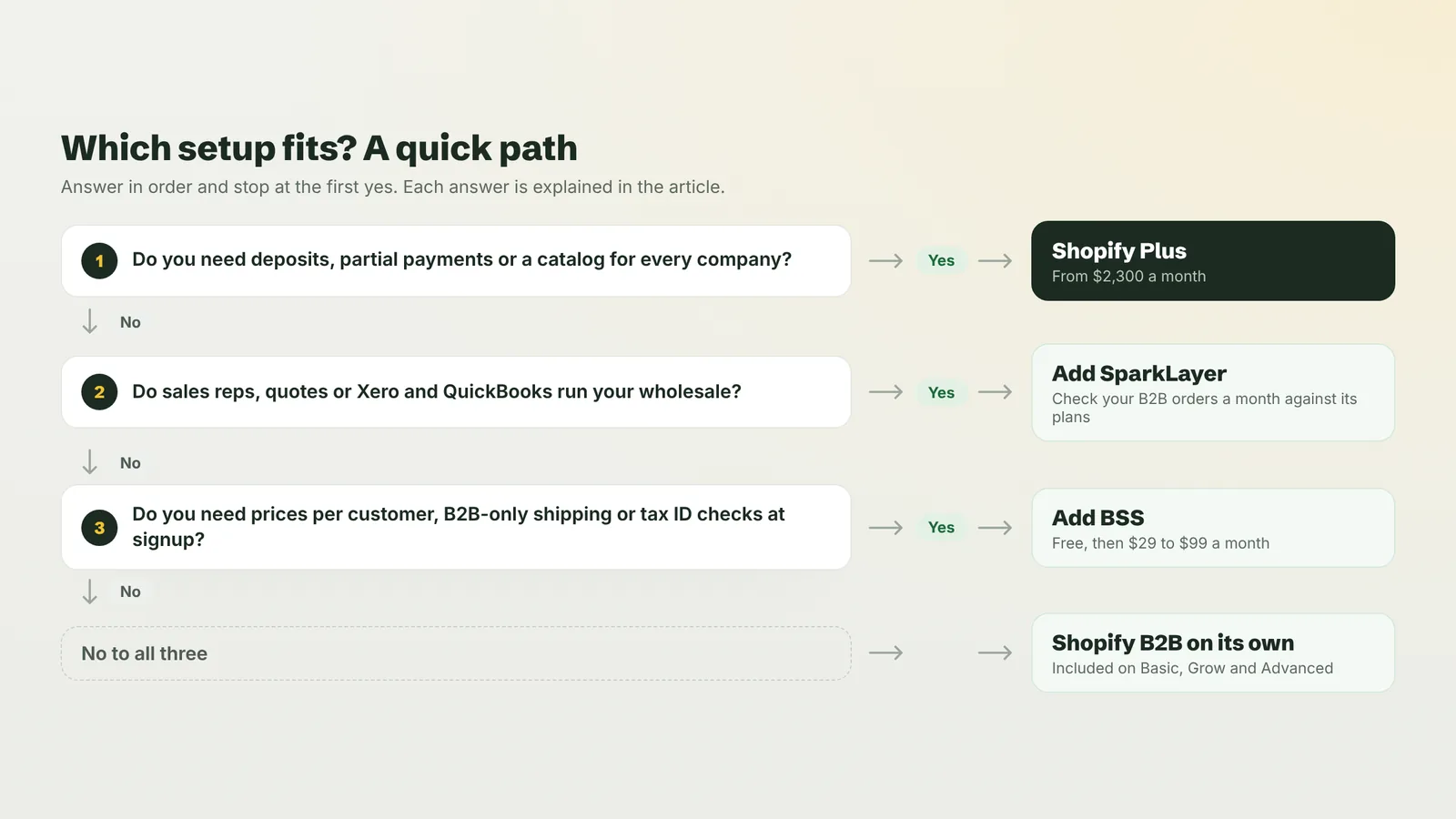
When something you can’t do without isn’t in the plan table above. Below Plus, the usual gaps are prices for individual customers, more than three price tiers, B2B-only shipping, tax ID checks at signup, B2B prices at Shopify POS, sales reps who order for buyers, quotes and accounting connections. BSS covers the pricing and signup gaps, and SparkLayer the selling and back-office ones. Each plan’s full price and contents are in the pricing section.
Add BSS for pricing and signup rules: free, then Essential at $29, Advanced at $49 or Platinum at $99 a month
- Prices for individual customers. Beyond Shopify’s three catalogs: BSS Advanced, which can also target Shopify company locations. Platinum adds a price list per customer and a public API for ERP pricing.
- More than three price tiers. Unlimited pricing rules from BSS Essential.
- B2B-only shipping rates and extra fees. BSS Advanced, without a separate delivery customization app.
- Order limits by product or customer. Minimum or maximum quantities or amounts for specific products, collections or the whole order, for the customers or tags you choose, on BSS Advanced. For one minimum across all B2B buyers, Shopify’s free Checkout Blocks is enough.
- Tax ID checks on the signup form. EU and UK VAT, ABN and GST from Essential; US EIN on Platinum. Shopify Tax validates VAT numbers later, on the company location.
- B2B prices at Shopify POS. BSS Platinum, through its separate POS app.
- Wholesale buyers who are tagged customers, not companies. Rules by customer tag, even on the free plan, which allows one pricing rule.
Add SparkLayer for reps, quotes and accounting: free, then Starter at $49, Growth at $149 or Pro at $299 a month
Each plan has a monthly limit on B2B orders placed through SparkLayer: 5, 50, 100 or 150.
- Reps who order for buyers. A sales agent portal: 1 rep on Starter, 2 on Growth and 5 on Pro, then $39 a month for each extra rep.
- Quotes inside the wholesale portal. Included on Pro, or a $49-a-month add-on below Pro that needs at least one sales rep.
- Xero, QuickBooks or ERP connections. Xero, QuickBooks Online and an API on Pro; its listing also names Cin7, Katana, Linnworks and Unleashed.
- Order approvals and invoices. Order approval workflows and downloadable invoices from Growth.
- Unlimited price lists. From Starter; the free plan allows 3.
- Orders built from a spreadsheet or email. AI order import, which SparkLayer calls Intelligent Cart, from Starter.
What are BSS and SparkLayer, and how do they work with Shopify?
Both are Shopify apps that add wholesale features on top of your store. BSS adds pricing, signup and order rules and leaves most orders to Shopify’s checkout. SparkLayer adds a full wholesale ordering layer, with its own cart, a portal for sales reps and accounting connections.
BSS B2B Wholesale Pricing is a Shopify app listed by BSS B2B Solutions in Hanoi, Vietnam, and documented on BSS Commerce’s site. It has been on the Shopify App Store since September 2020, carries the Built for Shopify badge and is rated 4.9 from about 1,200 reviews. It adds pricing, signup and order rules to your existing store, aimed at customer tags, specific customers or, on Advanced and Platinum, Shopify company locations. BSS sells quote requests and quick order pages separately, in BSS B2B Request a Quote, and login and hidden prices in BSS B2B Lock.
SparkLayer B2B & Wholesale is a Shopify app from SparkLayer, a company that builds only B2B software and lists an address in Bath, UK. It has been on the App Store since April 2021 and is rated 4.9 from 388 reviews. Besides price lists, quick ordering, company users and net terms, it adds a portal where sales reps order for buyers and, on higher plans, quotes, invoices and accounting connections. SparkLayer also runs on BigCommerce, Wix and Magento, with WooCommerce in early access.
How they sit in your store differs, and it matters later for tax, discounts and integrations. Shopify B2B uses Shopify’s own companies, catalogs and checkout. SparkLayer runs its own cart. Its docs say card payments go through Shopify checkout and arrive as completed orders, pay-later orders arrive as draft orders unless you turn on auto-complete, and with line item tax on it creates the draft order when the buyer reaches the shipping and payment step. It uses Shopify’s tax calculation rather than its own. BSS works inside your existing store: when a cart contains a B2B price or rule, its docs say the app creates the checkout itself and records the B2B price as a line discount unless you turn on price override. Its net-terms orders are saved as draft orders by default. Carts without a B2B rule go through the normal Shopify checkout, and tax still comes from your Shopify tax settings.
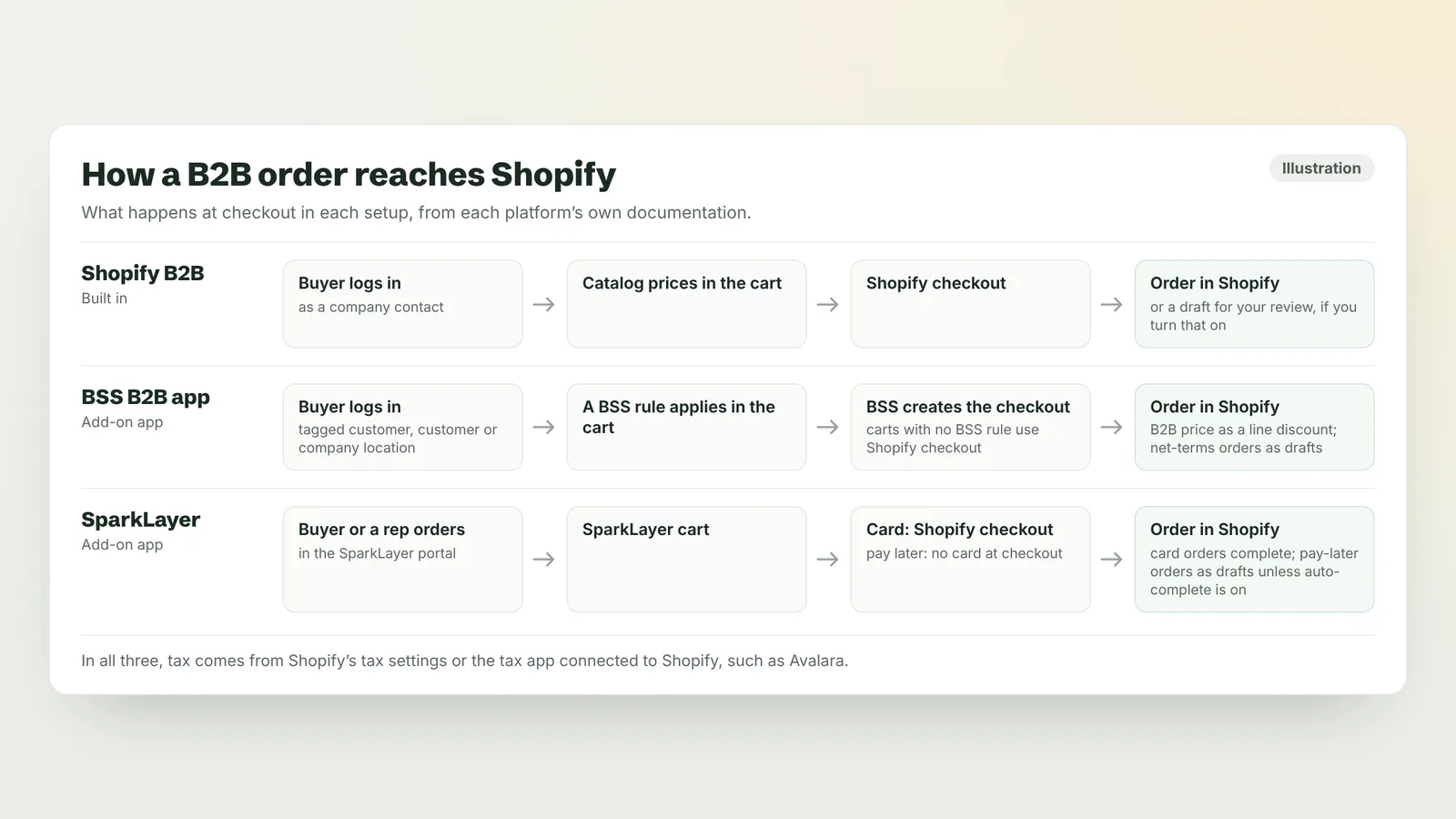
Shopify B2B vs SparkLayer vs BSS at a glance
Shopify’s column is the Basic, Grow and Advanced plans; Plus adds what the plan table lists under it. Plan prices are in the pricing section.
| Shopify B2B | BSS B2B Wholesale Pricing | SparkLayer | |
|---|---|---|---|
| Cost | Included in plans from $39 a month | Free; $29, $49 or $99 a month | Free; $49, $149 or $299 a month; Enterprise from $499 |
| Monthly order limits | None | None listed | 5, 50, 100 or 150 B2B orders a month |
| Price tiers | Up to 3 active catalogs | Unlimited rules from Essential | 3 price lists free; unlimited from Starter |
| Prices for one customer | For a few buyers, each in its own B2B market, within the 3-catalog limit; unlimited on Plus | Advanced | Listed on every plan |
| Minimum order value | Free Checkout Blocks app: a minimum or maximum subtotal for all buyers or only B2B companies | Advanced: by quantity or amount, per product or order, by customer or tag | “Order total rules” on every plan |
| Net terms | Net 7 to Net 90, with reminders | Advanced: due dates and reminders; orders saved as drafts by default | Pay on account, every plan; terms on Shopify company records are ignored |
| Signup with approval | Shopify Forms | Every plan; VAT, ABN and GST checks from Essential | Forms with approval, every plan |
| Quotes | Draft orders you send and invoice | Separate app, from $19 a month | Pro, or an add-on below Pro that needs a sales rep |
| Sales reps | Grow and up: staff limited to assigned locations | Not part of this app | Rep portal: 1, 2 or 5 reps by plan |
| Order approvals by the buyer | You review orders submitted as drafts; buyer-side approval isn’t listed | Not listed | From Growth: limited users can’t place orders |
| Shopify discounts | On by default; stack on catalog prices | Automatic discounts don’t apply while its prices are active; codes need a setting | Can’t be used alongside it; its own B2B discounts instead |
| B2B prices at Shopify POS | Not documented | Platinum, through its separate POS app | Not documented; its own “counter mode” in the storefront from Starter |
Shopify B2B pricing: how much do Shopify, SparkLayer and BSS cost?
Shopify B2B is included in plans from $39 a month. BSS adds nothing on its free plan, then $29 to $99 a month. SparkLayer adds nothing for up to 5 B2B orders a month, then $49 to $299, or from $499 on Enterprise. Shopify Plus starts at $2,300 a month. Shopify’s plan prices, catalog limits and transaction fees are in the plans section above.
BSS B2B Wholesale Pricing plans
| Plan | Price | What it adds |
|---|---|---|
| Free | $0 | One custom pricing rule, one volume pricing rule with up to 2 tiers and one registration form on a live store; every feature on development stores |
| Essential | $29 a month, or $313.20 a year | Unlimited custom pricing, volume pricing and quantity break rules; application approval with auto-tagging; EU and UK VAT, ABN and GST checks on forms |
| Advanced | $49 a month, or $529.20 a year | Customer-specific prices, tax exemption for B2B buyers, order limits and minimum values, wholesale-only shipping rates, pack sizes, extra fees and net terms |
| Platinum | $99 a month, or $1,069.20 a year | Price lists per customer, variant-level prices, bulk import and export, a public API for ERP or PIM pricing, US EIN checks, conditional forms and B2B prices at Shopify POS |
SparkLayer B2B & Wholesale plans
| Plan | Price | What it adds |
|---|---|---|
| Basic | $0 | Up to 5 B2B orders a month and 3 price lists; volume breaks, signup forms with approval, net terms and company users |
| Starter | $49 a month | Up to 50 B2B orders a month and 1 sales agent; unlimited price lists, B2B discounts and shipping rules, AI order import |
| Growth | $149 a month | Up to 100 orders and 2 sales agents; invoices, advanced discounts, stock locations, order approval workflows with automations, and file uploads |
| Pro | $299 a month | Up to 150 orders and 5 sales agents; quoting, Xero and QuickBooks Online, API access and a test mode |
| Enterprise | From $499 a month | Order volumes and sales agents set by contract, with direct ERP integration |
BSS charges by feature, with no order limits on its listing. SparkLayer charges by feature and by B2B orders a month, and its pricing page says the app keeps working if you go over, though its team may suggest a different plan.
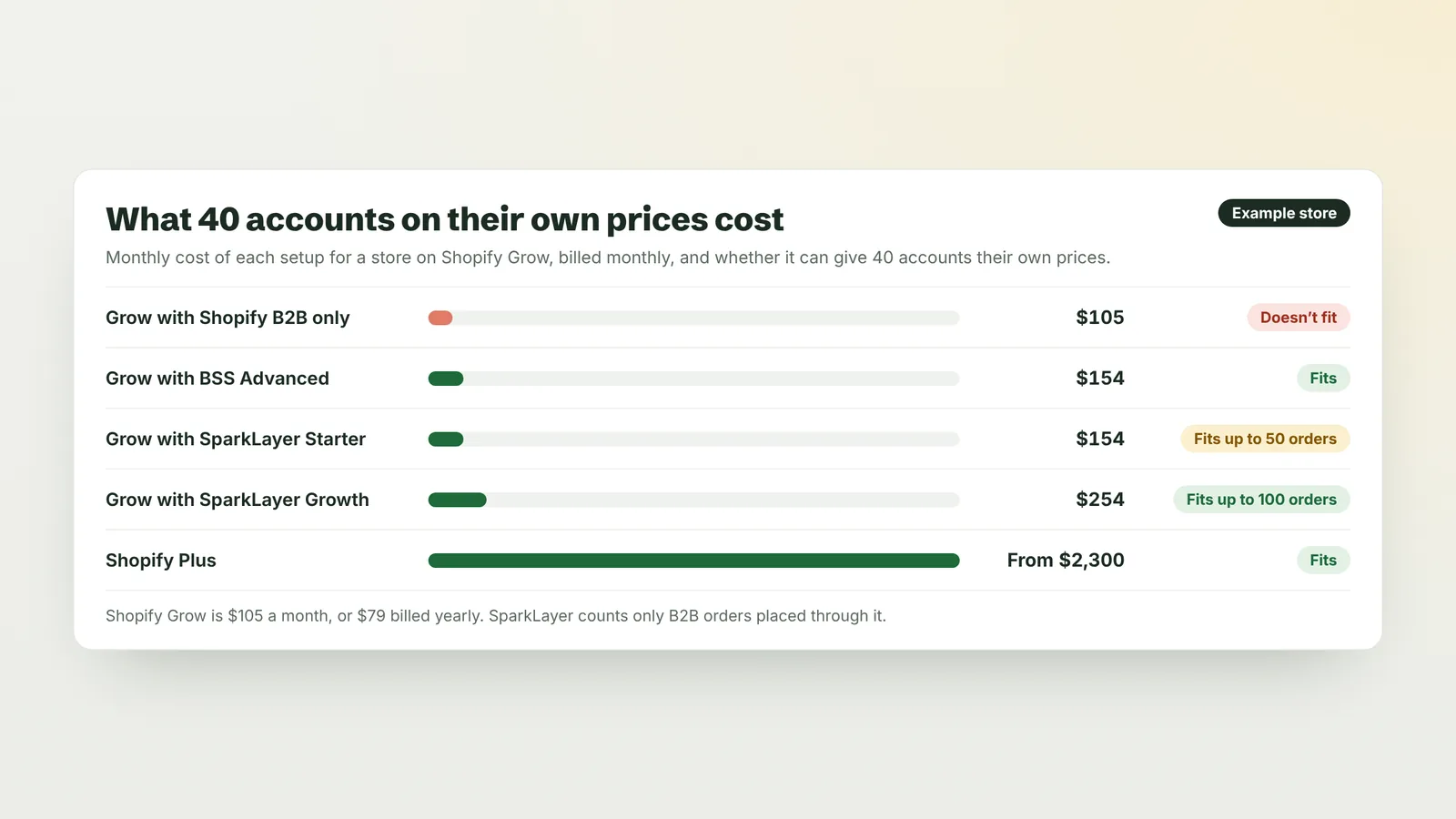
Worked example 1: 40 trade accounts on their own prices
Take a wholesale brand on Grow with 40 trade accounts, each buying at prices it negotiated.
| Setup | Per month | Does it fit? |
|---|---|---|
| Grow with Shopify B2B only | $105, or $79 billed yearly | No. Three catalogs can’t give 40 accounts their own prices. |
| Grow with BSS Advanced | $154, or $123.10 with both billed yearly | Yes, through customer-specific prices. |
| Grow with SparkLayer Starter | $154, or $128 with Shopify billed yearly | Yes, if the 40 accounts place 50 orders a month or fewer through it. Up to 100 needs Growth, $254 in all. |
| Shopify Plus | From $2,300 | Yes, with a catalog for each company. |
For per-customer prices alone, either app costs a small fraction of Plus.
Worked example 2: four reps taking about 80 orders a month
Now take a brand on Grow whose four reps visit stores and place most wholesale orders for their buyers, about 80 a month.
| Setup | Per month | Does it fit? |
|---|---|---|
| Grow with Shopify B2B only | $105 | Partly. On Grow, reps can work in the admin, limited to their assigned locations, but there’s no storefront portal where they order as each buyer. |
| Grow with BSS | $105 plus $29 to $99 | No. Sales reps aren’t part of the BSS pricing app. |
| Grow with SparkLayer Growth and 2 extra reps | $105 + $149 + $78 = $332 | Yes: 100 orders a month and 4 reps, with order approvals and invoices. |
| Grow with SparkLayer Pro | $105 + $299 = $404 | Yes, with 5 reps, quoting and a Xero or QuickBooks connection, up to 150 orders. |
Here the deciding factor isn’t price lists, it’s how orders are placed. If reps are central to how you sell, SparkLayer is the one of the three built around them.
BSS or SparkLayer: which app fits?
Both apps fill the gaps Shopify B2B leaves below Plus, but they’re built for different ways of selling.
- Choose BSS if your gaps are pricing, signup and order rules, and you want a fee set by features rather than order volume.
- Choose SparkLayer if your wholesale runs through people: reps ordering for buyers, quotes, approvals inside the buyer’s company, invoices and accounting, and your monthly order count fits its plans.
They also sit in your store differently, as explained above. SparkLayer takes over pricing and payment terms for the buyers it serves, while BSS only steps in when a cart has one of its rules. If you want Shopify’s native B2B to stay in charge for most buyers, BSS leaves more of it in place.
Order counts move the SparkLayer bill more than features do. At 120 B2B orders a month you’re past Growth’s limit of 100, so Pro, at $299, is the plan sized for you, while BSS Advanced stays at $49. Below that, the two start at similar prices: BSS Advanced and SparkLayer Starter are both $49 a month.
Not sure which setup fits?
Tell us how many trade accounts you have, how you price them and how orders come in. We’ll tell you which setup we’d pick and why.
Shopify B2B examples: which setup fits which store?
Typical wholesale setups, and what covers each one. Costs are the extra on top of your Shopify plan.
Shopify B2B on its own is enough
| Store | What it needs | What covers it | Extra a month |
|---|---|---|---|
| A coffee roaster selling to cafés | One wholesale price list, beans sold in cases of 12, and Net 30 terms. | One catalog with a quantity increment of 12, and payment terms on each café’s location. | $0 |
| A skincare brand with three trade tiers | Salons, spas and distributors each have their own prices, with deeper discounts at volume. US buyers want to pay by ACH. | Three catalogs with volume pricing, and ACH at checkout, on Basic, Grow or Advanced. | $0 |
| A furniture maker with repeat orders | Trade buyers reorder the same pieces every month, and each rep looks after their own accounts in the admin. | The quick order list, easy reorders, and on Grow or above, sales staff limited to their assigned locations. | $0 |
| A gift brand that vets every trade signup | Buyers apply, you approve them, and prices stay hidden until they log in. | The company account request form in Shopify Forms and the Trade theme, with each applicant checked by hand before you approve them. | $0 |
Add BSS
| Store | What it needs | What covers it | Extra a month |
|---|---|---|---|
| A UK supplier that checks VAT numbers at signup | Trade buyers in the UK and EU apply with a VAT number, and the supplier wants it checked before anyone is approved. | BSS registration forms with VAT checks, from its Essential plan. Shopify Tax also checks VAT numbers, but on the company location after approval. US EIN checks need BSS Platinum. | From $29 a month |
| A food wholesaler with pallet freight | Trade buyers get pallet shipping rates retail shoppers never see, and orders under $250 aren’t accepted. | BSS wholesale-only shipping rates, on its Advanced plan. The $250 minimum alone needs no paid app: Shopify’s free Checkout Blocks can apply it to B2B companies. | $49 a month |
| A brand taking orders at trade shows | Staff ring up wholesale orders on Shopify POS and need trade prices at the counter. | BSS Platinum, whose separate POS app adds a “B2B Price” tile that applies your price lists and rules as line-item discounts. | $99 a month |
| A boutique with five trade customers | A handful of interior designers get 20% off, and setting them up as companies feels like overkill. | One BSS pricing rule by customer tag, on the free plan. | $0 |
Add SparkLayer
| Store | What it needs | What covers it | Extra a month |
|---|---|---|---|
| A distributor that quotes and invoices in Xero | Most orders start as a quote, and finance wants every wholesale order in Xero. | SparkLayer Pro: quoting, invoices and a Xero connection, for up to 150 B2B orders a month. | $299 a month |
| A buyer team that needs sign-off | Each café chain has staff who build orders and a manager who approves them before they’re placed. | SparkLayer Growth, which lists company users and order approval workflows, for up to 100 orders a month. | $149 a month |
Where Plus makes sense
| Store | What it needs | What covers it | Extra a month |
|---|---|---|---|
| A manufacturer taking deposits | Buyers pay a deposit on made-to-order runs and the balance as orders ship. | Shopify Plus: deposits, partial payments and payment requests for each fulfillment. No plan below Plus offers them. | From $2,300 a month |
| A distributor with hundreds of accounts | Hundreds of buyers on negotiated prices, several markets, and well over 150 B2B orders a month. | Shopify Plus, with a catalog for each company. Compare it with SparkLayer Enterprise if reps and quotes matter too. | From $2,300 a month |
Which integrations work with Shopify B2B, SparkLayer and BSS?
In short: SparkLayer has the most ready-made ERP and accounting connections, BSS is the only one with documented B2B pricing in Shopify POS, and Shopify B2B itself works with tax apps such as Avalara and with partner-built ERP connectors. None of the three documents marketplaces using B2B prices. An integration only counts here if Shopify, the app maker or the integration’s vendor documents it, so “none documented” means untested, not impossible.
| Shopify B2B | BSS | SparkLayer | |
|---|---|---|---|
| Tax apps (Avalara, Vertex) | Supported as Shopify tax apps; company tax details are sent to the app for exemptions | Not named in its docs; tax comes from your Shopify tax settings | Uses Shopify’s tax calculation; its docs say to mark exempt buyers in Avalara too |
| ERP and inventory | Partner connectors Shopify lists: NetSuite, Business Central, Acumatica, Fulfil, Pipe17, Patchworks and others | Public API on Platinum for ERP or PIM pricing; no ERP named | Its own connections: Cin7 Core, Katana, Linnworks, Unleashed and Brightpearl, on higher plans |
| Accounting | Intuit’s QuickBooks connector maps B2B companies and terms; Xero through apps such as A2X | Sufio for B2B invoices; QuickBooks and Xero not named | Xero and QuickBooks Online built in, on Pro |
| Marketplaces | Faire, Marketplace Connect and Collective run beside B2B; none says it uses B2B catalogs | None documented | None documented |
| Shopify POS | Not documented for B2B companies or catalog prices | Platinum, through its own POS app | Not documented; its own counter mode in the storefront |
| Payments | Net terms; ACH and saved cards through Shopify Payments | Net terms on Advanced, added to orders as Shopify payment terms | Pay on account, by invoice, or by card in Shopify checkout |
| Email and CRM | HubSpot company sync on Plus only; Klaviyo doesn’t document B2B companies | Klaviyo receives registration form events, Advanced and up | None documented |
| Automation and API | Shopify Flow with B2B templates; Admin API for companies and price lists | Zapiet, EasyCSV and Order Printer Pro documented; LangShop and Flow listed | Its API on Pro; Shopify Flow suggested for draft order alerts |
Before you rely on any integration with an app, place a test order and follow it end to end. Both apps can hand Shopify a draft or unpaid order rather than a normal checkout, as explained above, so tax, invoicing and ERP tools may see a different kind of order than they expect.
Tax: Avalara, Vertex and Shopify Tax
A store uses one tax service: Shopify Tax or a tax app. Shopify lists Avalara Tax Compliance and Vertex as tax apps, and for B2B stores a company’s tax information “is transmitted to the tax app provider to calculate tax exemptions,” with company location exemptions taking precedence over customer ones. Avalara says its Shopify app “supports all Shopify plans,” with exemption certificates managed inside Shopify for Plus stores, and its listing shows pricing “starting at $699/state/year.”
On Shopify Tax, each company location can collect tax, not collect it, or collect it unless exemptions apply, and EU and UK VAT numbers on a location are validated. The VAT checks at checkout that Shopify Tax added in February 2026 don’t cover B2B checkouts yet. Neither app calculates tax: SparkLayer “uses your eCommerce platform’s tax settings” and says to mark exempt buyers in Avalara or TaxJar too, and BSS’s tax-exempt option sets selected customers to “Don’t collect tax” in Shopify. BSS’s docs don’t mention Avalara.
ERP and inventory
Shopify’s B2B integrations page lists partner-built connectors, including Acumatica, Microsoft Dynamics 365 Business Central, the NetSuite ERP Connector, Fulfil, Pipe17 and Patchworks. Microsoft’s connector imports company locations with their payment terms and tax IDs, and can create B2B catalogs and sync prices. Oracle’s NetSuite Connector syncs B2B companies and catalog prices, though “Per-location catalog assignment is not supported,” and its B2B plan is listed at $916.58 a month.
SparkLayer connects to Cin7 Core, Katana, Linnworks, Unleashed and Brightpearl. Its partner pages put these on Professional and Enterprise, its pricing page on Enterprise, so confirm the plan with SparkLayer; its API, on Pro and Enterprise, covers other systems. BSS names no ERP; its public API, on Platinum, is for “integrating B2B pricing with external ERP or PIM systems.”
Accounting: QuickBooks and Xero
Intuit added native B2B support for Shopify merchants to QuickBooks in June 2026: it maps Shopify B2B companies to QuickBooks customers and brings invoices across with PO numbers and payment terms. Xero hasn’t published an equivalent; A2X documents separate Xero invoices for tagged B2B orders. SparkLayer has Xero and QuickBooks Online built in on Pro, and its docs say Xero payments sync back to the order, while QuickBooks data goes one way. BSS documents Sufio for B2B invoices, but not QuickBooks or Xero.
Marketplaces: Faire, Amazon and Shopify Collective
Marketplaces run beside your B2B setup rather than through it. Faire’s Shopify app syncs products, inventory and your choice of retail or wholesale prices, and brings orders back once you accept them. Shopify Marketplace Connect lists products on Amazon, eBay and, in the US, Walmart and Target Plus, free for the first 50 synced orders a month, then 1% per order up to $99 a month. Shopify Collective connects suppliers and retailers, with suppliers setting price lists inside Collective. None of these documents using Shopify B2B companies or catalogs, neither app documents a marketplace integration, and Shopify doesn’t document Amazon Business support.
Shopify POS
Shopify’s B2B pages don’t document B2B companies or catalog prices in POS. On BSS Platinum, a separate POS app adds a “B2B Price” tile that applies your price lists and rules as line-item discounts, though rules set by company location don’t apply at POS. SparkLayer added a counter mode in October 2026, a full-screen till inside its own storefront widget. For the counter side, see our guide on when to switch to Shopify POS.
Payments and net terms
Since June 2026, a Shopify Flow action can charge a saved card or bank account when a net-terms payment falls due, instead of you chasing it. BSS saves net-terms orders as drafts for your review, or places them automatically, with Shopify payment terms and a due date. SparkLayer takes payment on account, by invoice or by card in Shopify checkout, and its docs say ACH in its own checkout is in development. Financing apps such as Balance, Resolve and Credit Key are on the App Store, but their listings don’t say whether they work with Shopify’s built-in B2B.
How do you set up Shopify B2B?
Choose your store type and check the requirements, then follow Shopify’s eight setup steps: companies, catalogs, customer accounts, payment and shipping, and testing as a buyer before you invite anyone. Two things come first:
- Choose one store or two. A blended store for retail and wholesale, or a dedicated B2B store. Shopify says the choice is hard to change later.
- Check the requirements. On Basic, Grow or Advanced, your store must use the new Shopify Markets for B2B catalogs. If your trade buyers are already customers in your admin, move them into companies before you start.
Shopify’s checklist for a blended store then runs in this order:
- Create companies and locations. By hand, by import with a tool such as Matrixify, or through the API with a Shopify Partner. Give each location its addresses, tax ID and exemptions, and payment terms.
- Create catalogs. Set the products, prices, volume pricing and quantity rules for each tier, and assign each catalog to a B2B market with a company locations condition, so retail prices don’t change. Below Plus, that’s three active assignments in all.
- Turn on customer accounts for B2B buyers. B2B needs Shopify’s current customer accounts. Retail customers can stay on legacy accounts if B2B buyers get the new login link.
- Set payment and shipping methods. Decide what B2B buyers can use at checkout. To offer a method only to B2B buyers or only to retail customers, Shopify points to its Checkout Blocks app or a custom or third-party app.
- Customize the storefront, if you need to. The Trade and Horizon themes show volume pricing and quick order. Showing different theme content to B2B and retail buyers needs Advanced or Plus.
- Turn on sales staff ordering, if you use reps. On Grow and up, staff can take orders and manage accounts for their assigned company locations in the admin.
- Add the extras you need. The signup form in Shopify Forms, a minimum order value in Checkout Blocks, B2B discounts, Shopify Flow automations, and any apps.
- Test, then invite buyers. Log in as a test customer, or use the View option next to a company location in the admin, and check prices in both the B2B and retail experiences. Then invite buyers to log in.
A dedicated B2B store follows nearly the same steps, starting with moving customer data into the new store, and the store itself can be gated to B2B buyers. Shopify’s full checklists for blended and dedicated stores are in its Help Center.
Running an app alongside Shopify B2B: what to watch
Both apps can work next to Shopify’s own B2B, but each sets rules about who controls what.
SparkLayer with Shopify companies
- Companies sync one way. Shopify companies come into SparkLayer and are managed in Shopify. This needs SparkLayer 5, released in October 2026.
- Its prices win. SparkLayer’s price lists replace the prices in a Shopify catalog, though not the catalog’s product list, and the payment terms on Shopify company records are ignored.
- One checkout per buyer. Its docs say Shopify’s own B2B checkout and catalog prices don’t run alongside SparkLayer for the same customer, and that Shopify discounts can’t be used with it.
BSS with Shopify companies
- Company location rules need Advanced or Platinum, and only reach buyers with B2B access. Selecting a whole company covers its current locations; new ones need adding yourself.
- Automatic discounts. BSS’s docs say Shopify automatic discounts don’t apply while its custom or volume pricing rules are active on a checkout, and discount codes only appear once you switch on a setting.
- Order limits are checked in the cart. Its docs note that a shopper who goes straight to checkout, or uses an express payment button in the cart, skips the check. Shopify’s Checkout Blocks limit is checked at checkout instead, so for a single minimum order value it’s the more reliable of the two.
Whichever you choose, decide where each buyer’s price comes from, a Shopify catalog or the app, and keep it there. BSS’s own quote app gives the same advice: “Keep pricing logic in one place.” Then test as each kind of buyer: BSS gives every feature free on development stores, and SparkLayer has a test mode on Pro.
Switching later: from an app to Shopify B2B, or between apps
If everything you use now fits in what your plan includes, moving from an app to Shopify’s own B2B follows the setup steps above, with three steps around them:
- List what the app does for you today. Every pricing rule or price list, form, tax setting, shipping rule and net terms setup, and which buyers each one applies to. Rules that don’t fit into three catalogs are a sign to keep an app or plan for Plus.
- Move buyers into companies. Existing wholesale customers and their order history can be moved into companies. For many accounts at once, a bulk import tool such as Matrixify can create companies and their locations from a spreadsheet and link customers you’ve already imported to them.
- Test, then remove the app. Log in as each kind of buyer and check prices, the cart, checkout, discounts and order emails. Then switch off the app embed and uninstall.
Moving between the two apps follows the same order: list what the first one does, rebuild it in the second, and test as each kind of buyer before you switch off the first. Moving from Magento rather than another Shopify app? Our Magento to Shopify migration service covers B2B stores.
What’s new in Shopify B2B? Updates from 2025 and 2026
The biggest change came on April 2, 2026, when Shopify’s core B2B features came to Basic, Grow and Advanced at no extra cost. These are the main B2B updates in Shopify’s changelogs since mid-2025, newest first:
| Date | What changed | Who gets it |
|---|---|---|
| Oct 28, 2026 | Fall ’26 Edition: B2B catalog CSV exports show vendor details, with a vendor filter for faster price updates | Stores using B2B catalogs |
| Jun 23, 2026 | B2B discounts switched on by default, with no need to contact Support | New B2B stores and eligible existing ones |
| Jun 17, 2026 | A Shopify Flow action that charges a saved card or bank account when a net-terms payment is due | Stores with saved B2B payment methods |
| May 7, 2026 | Discounts can be limited to specific markets, so a wholesale offer only reaches B2B buyers | Basic and up, on the new version of Markets |
| Apr 13, 2026 | Order value limits in the free Checkout Blocks app: a minimum and maximum order subtotal, checked at checkout | Basic, Grow, Advanced and Plus |
| Apr 2, 2026 | Company profiles, payment terms, volume pricing, ACH, vaulted cards and up to three catalogs | Basic, Grow and Advanced, at no extra cost |
| Dec 10, 2025 | Volume pricing, quantity rules and quick order lists work in every Horizon theme | Any store on a Horizon theme |
| Oct 23, 2025 | ACH direct debit bank payments for B2B orders | US merchants using Shopify Payments |
| Oct 1, 2025 | Rules that decide which B2B orders go to draft for your review, based on order value, cart contents or the customer | Plus only, built with a payment customization function |
| Jul 4, 2025 | B2B buyers can pay at checkout with manual payment methods you’ve set up, such as bank deposit | Announced for Plus; Shopify’s feature overview now lists it with no plan limit |
Four of these cover ground that used to need an app: Horizon themes with volume pricing and quick order, B2B discounts on by default, minimum order values in Checkout Blocks, and Flow collecting net-terms payments from a saved card or bank account.
Questions merchants ask about Shopify B2B, SparkLayer and BSS
Can I use Shopify B2B without Shopify Plus?
Yes. Since April 2, 2026, Shopify B2B is included on Basic, Grow and Advanced as well as Plus, though not on Starter or Retail. Below Plus you get up to three active catalog assignments and no deposits or partial payments; Plus removes those limits.
Can I sell wholesale and retail from the same Shopify store?
Yes. Shopify calls this a blended store: retail shoppers see your normal prices, and B2B buyers see their own catalog once they log in. The store can’t be closed to the public, so if you want a wholesale site only trade buyers can see, you need a separate B2B store, which means setting up and paying for apps again. Shopify says the choice is hard to change later.
What happened to the Shopify Wholesale channel?
Shopify retired the Plus Wholesale channel in 2024, citing a change in Google Chrome’s third-party cookie support, and asked merchants using it to move to B2B on Shopify. B2B on Shopify replaced it, and since April 2, 2026 it’s on Basic, Grow and Advanced as well as Plus.
Can I set a minimum order value on Shopify without an app?
Yes, with Shopify’s own free Checkout Blocks app. Since April 13, 2026, its order value limits work on Basic, Grow, Advanced and Plus, for all customers or only B2B companies, and they’re checked at checkout whatever the payment method. For different limits by product, collection or customer tag, BSS Advanced covers it, and SparkLayer has order total rules on every plan.
What’s the best wholesale app for Shopify: SparkLayer or BSS?
It depends on how you sell, and you may not need either: start with what your Shopify plan includes. Between the two, BSS is the cheaper way to add pricing and signup rules, from $29 a month, priced by features. SparkLayer, from $49 a month with monthly limits on B2B orders, is the stronger choice when reps take orders for buyers or you want quotes, invoices and accounting in one wholesale portal. Neither needs Shopify Plus.
Does Shopify B2B have request a quote?
Not as a separate feature. Draft orders work as quotes: you set a negotiated price on a line, lock it and send an invoice, and buyers can submit orders for your approval. For a quote request form, use an app such as BSS B2B Request a Quote, from $19 a month, or SparkLayer’s quoting, on Pro or as a $49-a-month add-on that needs at least one sales rep.
How we checked this guide. Every price, limit and feature here comes from Shopify’s Help Center and changelog, each app’s Shopify App Store listing and documentation, or the integration vendor’s own pages, checked between November 3 and 7, 2026. We didn’t run the apps on a test store for this guide, so where nobody documents something, we say so instead of guessing. Thrivepine is a Shopify agency and isn’t affiliated with BSS or SparkLayer. Plans and prices change, so check each listing before you decide.
Sources
- Shopify: Changelog: key B2B features on non-Plus plans (April 2, 2026), Help Center: B2B on Shopify, B2B features by plan, choosing a store type, blended store checklist, dedicated store checklist, Wholesale channel to B2B migration FAQ, VAT number validation, B2B requirements and considerations, companies, sales staff, B2B discounts, draft orders, payment terms, B2B in multiple currencies
- Shopify changelog, 2025–2026: B2B discounts on by default (June 23, 2026), Flow: automatic charging for vaulted payment methods (June 17, 2026), discounts by market (May 7, 2026), Checkout Blocks order value limits on all plans (April 13, 2026), order value limits, Horizon themes (December 10, 2025), order review rules (October 1, 2025), store credit for company locations (September 15, 2025), pickup in store (August 15, 2025), manual payment methods (July 4, 2025), Fall ’26 Edition
- Shopify pricing and integrations: Shopify plans, B2B external integrations, tax apps, tax exemptions for tax apps, Marketplace Connect requirements, Marketplace Connect on the App Store, Shopify Collective
- BSS: App Store: BSS B2B Wholesale Pricing, BSS B2B Request a Quote, BSS B2B Lock, BSS B2B Wholesale Solution docs, including integrations, tax, net terms and Shopify POS, order limits
- SparkLayer: App Store: SparkLayer B2B & Wholesale, pricing, docs: tax and shipping, Shopify companies, Shopify limitations, payment methods, Xero, Cin7 Core, what’s new
- Integration vendors: Avalara for Shopify, Avalara Tax Compliance on the App Store, Vertex for Shopify, Microsoft: Business Central companies sync, Oracle NetSuite Connector: Shopify B2B, Intuit: QuickBooks B2B support for Shopify, A2X: B2B orders in Xero, Faire: integrating with Shopify, HubSpot: Shopify data sync, Sufio: BSS B2B Wholesale