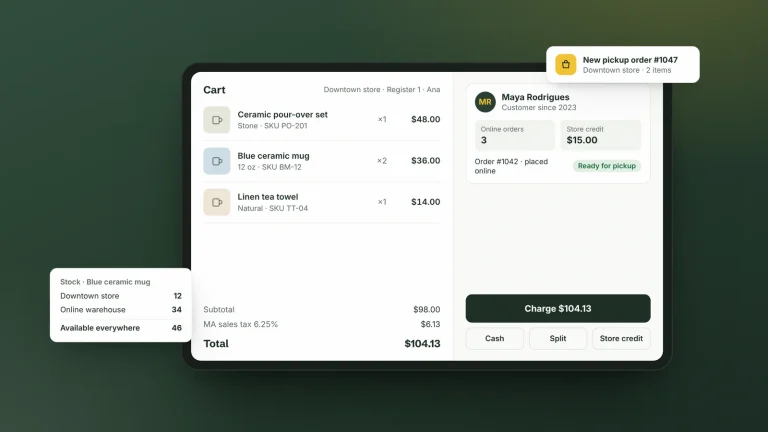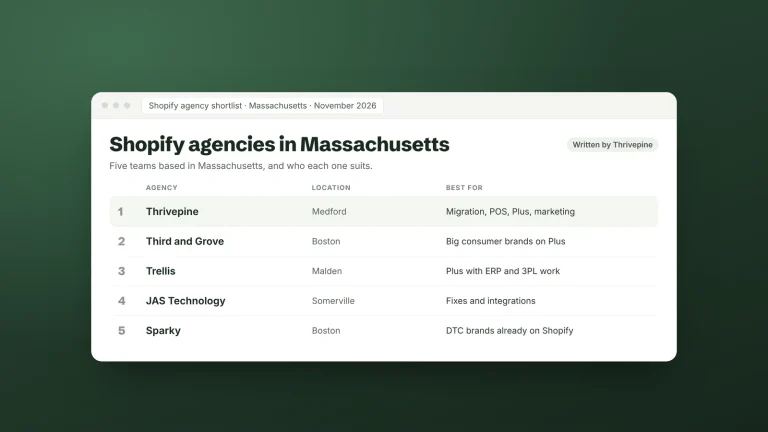

Magestore POS is a Magento point of sale built into your store: it runs in a web browser, connects to card processors such as Stripe and Square from its POS Simple plan up and, on a one-time license, gives you the source code on request. Shopify POS is Shopify’s own app, included with every paid Shopify plan, with Shopify running the platform, the updates and the card payments. If you’re staying on Magento, Magestore is an established, well-reviewed choice. If you’re weighing a move, the real comparison is Magento with Magestore against Shopify with Shopify POS, and that’s what this guide covers.
In this article
What are Magestore POS and Shopify POS?
Magestore POS is a Magento POS extension from Magestore, a company founded in 2009 and based in Hanoi, Vietnam. It installs into your Magento store, so there’s no separate Magento POS integration to maintain: the register works on the same products, customers, stock and orders as your website. Staff use it in a web browser on a PC, Mac, tablet or iPad. Capterra reviewers rate it 4.9 out of 5 across 44 reviews, and Scandiweb’s roundup of the best POS systems for Magento calls it the most consistently recommended Magento-native option.
Shopify POS, short for Shopify Point of Sale, is Shopify’s own app for selling in person, on iPhone, iPad and Android devices. Every paid Shopify plan includes the Shopify POS system, and Shopify POS Pro adds staff roles, returns and exchanges at any location, pickup in store, and counting and receiving stock in the app, for $89 per location per month. It shares one catalog, customer list and stock count with the Shopify online store.
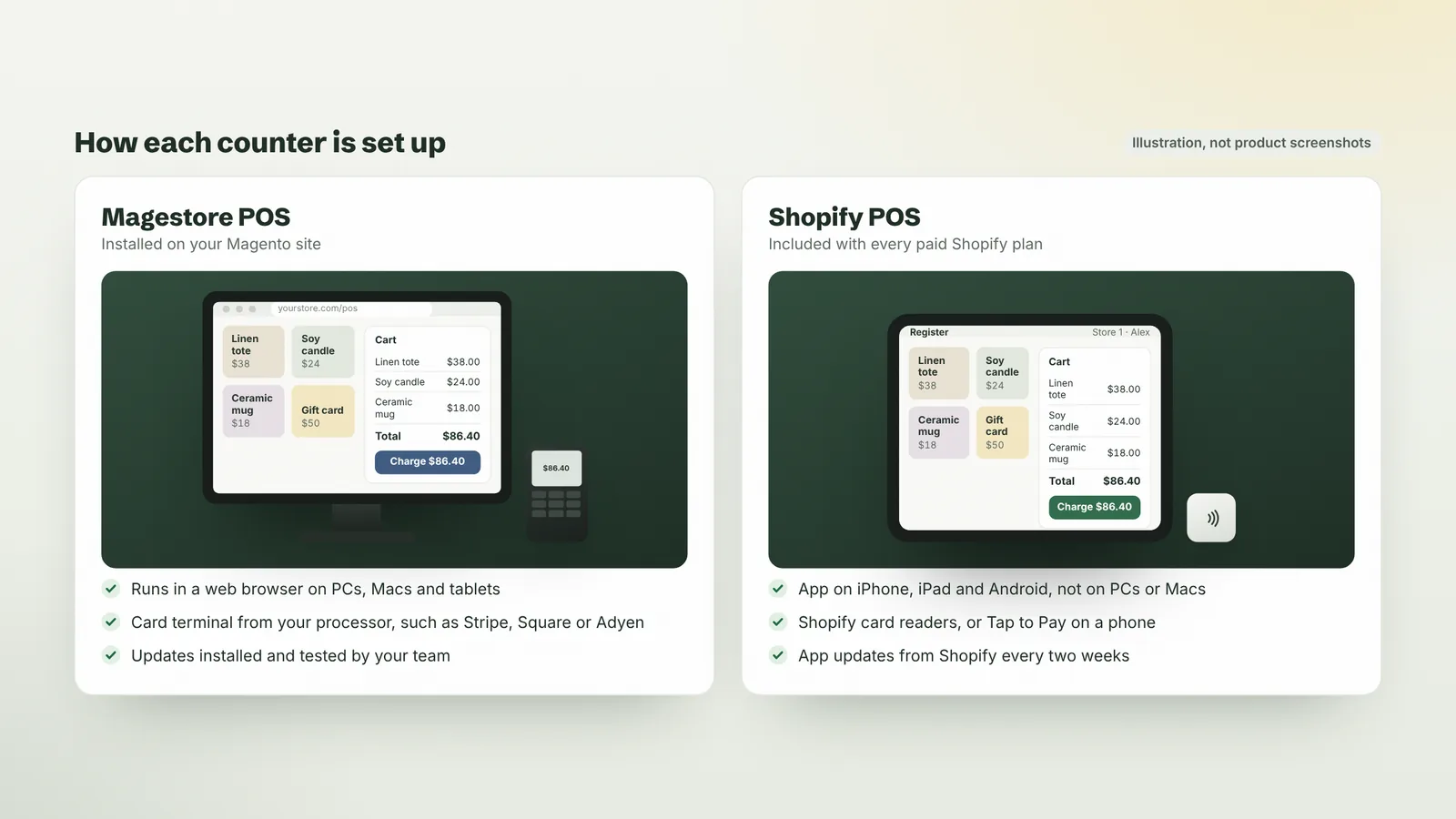
Both are native to their platform, and that matters more than any single feature. Choosing Magestore means staying on Magento. Choosing Shopify POS means moving to Shopify. So any Magento POS vs Shopify POS comparison is really a platform decision.
Magestore POS vs Shopify POS at a glance
| Magestore POS | Shopify POS | |
|---|---|---|
| Platform | Magento Open Source and Adobe Commerce | Shopify, on every paid plan |
| Runs on | A web browser on PCs, Macs, tablets and iPads | The Shopify POS app on iPhone, iPad and Android |
| Price | $69 or $89 a month, or a one-time license by quote | Included in your plan; POS Pro $89 per location per month |
| Card payments | From POS Simple up, integrated processors such as Stripe, Square and Adyen | Shopify Payments, from 2.6% + 10¢ on Basic to 2.3% + 10¢ on Plus in the US |
| Selling offline | Every plan; card payments offline depend on the terminal | Cash and custom payment methods, and cards on Shopify readers within limits you set |
| Stock across locations | Magento’s Multi-Source Inventory; transfers, purchase orders and suppliers on POS Commerce | Built in; purchase orders and transfers in the admin; counting and receiving stock in the app with POS Pro |
| Gift cards and loyalty | Gift cards, store credit and reward points from POS Simple up | Gift cards and store credit built in; points programs through apps |
| Pickup in store | Click and collect on POS Commerce | Pickup and local delivery with POS Pro |
| Updates | Installed on your Magento site; one-time licenses include a year of updates | Shopify updates the app every few weeks |
| Customizing | Source code on request, with one-time licenses | POS UI extensions and apps |
| Support | Helpdesk, Slack, video calls and email, depending on plan; premium tiers for faster replies | Chat 24/7 on every plan; phone with POS Pro or Plus |
How much do Magestore POS and Shopify POS cost?
Magestore POS pricing
| Plan | Price | Works with | What it adds |
|---|---|---|---|
| POS Lite | $69 a month, after a 7-day trial | Magento Open Source | Checkout, offline mode, refunds and Multi-Source Inventory, installed on your Magento site; cash and card payments, without processor integrations |
| POS Simple, monthly | $89 a month, plus $25 for each additional store | Magento Open Source | Gift cards, store credit, reward points, and Stripe, Square and Adyen payments |
| POS Simple, one-time license | Custom quote | Magento Open Source and Adobe Commerce | The same features, with source code on request |
| POS Commerce, one-time license | Custom quote | Magento Open Source and Adobe Commerce | Stock transfers and adjustments, purchase orders, suppliers, click and collect and wider reports |
A one-time license covers one live site, with unlimited users, devices and locations, free implementation and a year of support and updates. After 365 days, Magestore asks you to renew the warranty to keep receiving both, and it doesn’t publish that price. POS Lite is the version listed on Adobe’s Commerce Marketplace, with installation support for $50. Card fees go to your processor; Magestore says it takes no percentage of transactions.
Shopify POS pricing
| Plan | Per month | In-person card rate | POS Pro |
|---|---|---|---|
| Basic | $39, or $29 billed yearly | 2.6% + 10¢ | $89 per location |
| Grow | $105, or $79 billed yearly | 2.5% + 10¢ | $89 per location |
| Advanced | $399, or $299 billed yearly | 2.4% + 10¢ | $89 per location |
| Plus | From $2,300 on a 3-year term | 2.3% + 10¢ | 20 locations included, up to 200 with Shopify Payments |
The Shopify POS Pro subscription is charged per location. In the Shopify Hardware Store, Shopify POS hardware runs from the $49 Tap & Chip card reader to the $349 POS Terminal and Verifone’s $399 Victa Mobile handheld, and the app runs on an iPad or phone you already own. New stores on Basic, Grow or Advanced get 3 days free, then 3 months for $1 a month.
Two stores, side by side
Take a gift shop with two locations on Magento Open Source, taking $20,000 a month by card across 400 sales, and compare the counter alone.
| Per month | Magestore POS Simple with Stripe | Shopify Grow with POS Pro |
|---|---|---|
| POS software | $114 ($89, plus $25 for the second store) | $178 (POS Pro, two locations) |
| Platform plan | Not included: Magento hosting, patches and developer time | $79 (Grow, billed yearly), online store included |
| Card fees | $560 (Stripe Terminal, 2.7% + 5¢) | $540 (2.5% + 10¢) |
| Total | $674, plus Magento costs | $797, including the Shopify plan |
Neither column includes hardware, Magestore’s optional $100 installation fee or a loyalty app on Shopify to match Magestore’s reward points. The features don’t line up exactly either: on Shopify, purchase orders and transfers are handled in the admin and POS Pro adds counting and receiving stock in the app, while on Magestore purchase orders and transfers need POS Commerce. And Magestore doesn’t say whether an “additional store” means a location, so confirm that before you budget.
Set the Shopify plan aside and the two counters are about $44 a month apart. If you use Shopify Tax, add about $70 a month once its $100,000 lifetime free threshold is used up, which takes about five months at this volume (0.35% of each order in the states where you collect, capped at 99¢). The bigger difference is everything around them: on Magento you also pay for hosting, security patches, upgrades and the developer who keeps extensions working together, while on Shopify that’s part of the plan. Our guide on when to migrate to Shopify works through those platform costs with a worked example.
Card payments: your own processor or Shopify Payments?
Magestore doesn’t process payments. From POS Simple up, it connects to processors such as Stripe, Square and Adyen, and its integrations page also lists Authorize.net, Clover, Braintree and PayPal for the US; check which come with your plan. Magestore says it can integrate other terminals that offer a web or cloud API, which typically takes up to two weeks. That lets you keep a processor you’ve already negotiated with, and a retailer on interchange-plus pricing may pay less per sale than Shopify’s published rates.
Shopify POS takes in-person card payments through Shopify Payments, at the rate your plan sets, on a supported Shopify card reader. A Stripe, Clover or Square terminal from your Magento setup won’t integrate: you could run it on its own and record those sales as a custom payment, but nothing would sync. In return, software and payments come from one provider, with one payout, and Tap to Pay on iPhone (XS or newer) and on Android phones, on every plan and at the same in-person rate, so a phone can take contactless cards with no reader at all.
Which works better offline, Magestore POS or Shopify POS?
Magestore includes offline mode on every plan. By its own description, the register keeps working from a local copy of products, customers, prices and stock, calculates totals and discounts, and queues each sale until Magento confirms it. Magestore also says staff can search customers and process refunds while offline. Two caveats come from Magestore too: stock is only as current as the last sync, and a card taken offline is authorized only when the terminal reconnects, so it can still be declined later.
Shopify POS keeps cash and custom payment methods working offline. Card payments work offline only if you switch them on in advance, on supported card readers rather than Tap to Pay, within a per-device daily limit and a per-sale limit you set. Shopify says to reconnect ideally within 24 hours. While offline, staff can’t process returns, exchanges or gift cards, look up customers, or use discount codes and automatic discounts. Since this summer, the POS home screen shows whether the internet, Shopify’s service and your hardware are connected.
For long or frequent outages, Magestore describes more of the counter working offline, including customer lookups and refunds. Shopify keeps the sale itself going, within clear limits. A phone hotspot at the counter is a sensible backup with either.
Inventory management, purchasing and pickup in store
Magestore works with Magento’s Multi-Source Inventory on every plan, so each store can sell from its own stock. POS Commerce adds stock transfers and adjustments, purchase orders, supplier management, click and collect, backorders and dropshipping.
Shopify tracks stock by location on every plan. Purchase orders, suppliers and transfers live in the Shopify admin, and became the standard way to do this when Shopify closed its Stocky app on August 31, 2026. At POS Pro locations, staff can count stock in the app, including scheduled counts set up in the admin, a feature added in September 2026. Each variant can now carry up to 20 barcodes, and POS Pro adds pickup in store and local delivery booked at the counter. Purchase orders export as a PDF to send to your supplier. If you track landed costs today, check how you’ll do that on Shopify before you switch.
Gift cards, store credit and loyalty
From POS Simple up, Magestore includes gift cards, store credit and reward points. Since December 2025, Magestore and Hyvä, the Magento theme company, have made these work on Hyvä storefronts and Hyvä Checkout, so customers can use them online and in store.
Shopify POS sells and redeems gift cards on every plan, and store credit is built in. Staff can issue store credit, refund returns to it and redeem it at the counter. Points programs come from loyalty apps, many of which work inside Shopify POS. October’s 11.17 update identifies more customers who tap a card on eligible Shopify Payments transactions, and attaches repeat customers to the order.
Upgrades: who keeps the counter running?
On Magento, you or your developer install every update, on Adobe’s schedule. In 2026 that meant security patch releases on March 10 and May 12, alongside Magento 2.4.9 in May, then a security update every month from July to October. Adobe supports each Adobe Commerce 2.4 release for about three years: regular support for 2.4.6 ended on August 11, 2026, and for 2.4.7 it ends on May 31, 2027, with a free year of extended support after each. On Magento Open Source, the July and August updates covered only 2.4.6 and later, and the September and October updates only 2.4.7 and later, so an older store has to upgrade before it can patch. Adobe also issued an urgent hotfix on September 7 for a critical flaw it says was being exploited. Each upgrade means testing the POS, the theme and every other extension together.
Magestore’s website says its current version works with Magento 2.4.9, Hyvä Theme and Hyvä Checkout. On a one-time license, updates for later Magento releases need an active warranty after the first year.
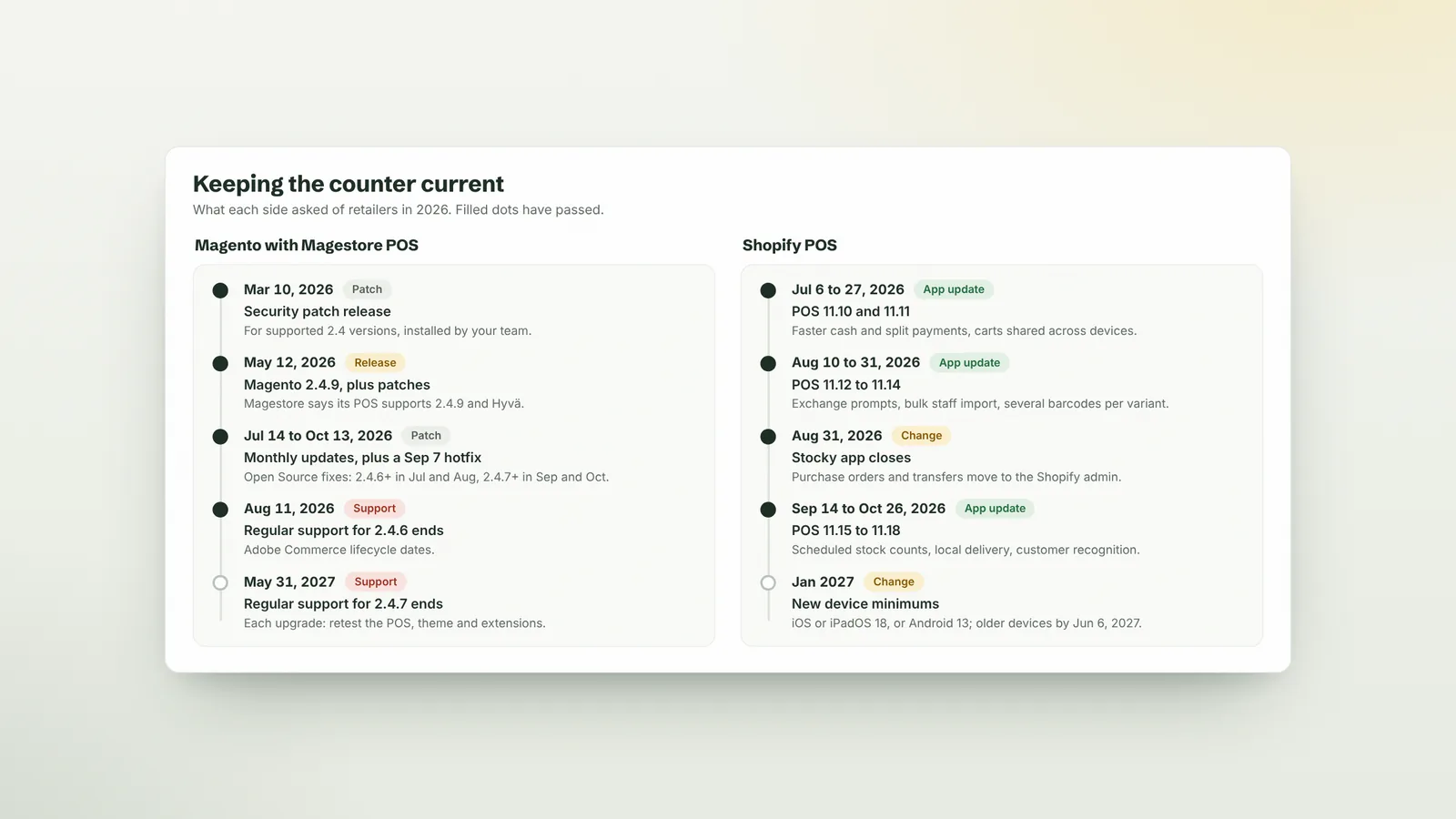
Shopify POS updates arrive through the app, with no server to patch. Shopify released nine POS versions between July 6 and October 26, 2026, and has paused major releases for the rest of the year. Shopify sets deadlines of its own, though, and the next section lists the ones already announced for 2027.
What’s next for Shopify POS in 2027?
Shopify doesn’t publish a public roadmap for new Shopify POS features. It announces changes in its Editions, its monthly Retail Roundup, its Help Center and its hardware partners’ news. As of October 30, 2026, these are the main POS changes Shopify has announced that are still to come:
| When | What Shopify has announced | What it means for a store |
|---|---|---|
| Rest of 2026 | No major POS app releases until 2027; Shopify says the remaining 2026 POS versions are bug fixes and reliability work. | Shopify says this means no changes to POS app features during the busy season. |
| January 1, 2027 | Receipt customizations written in Liquid code must be migrated to Shopify’s new receipt editor. | Stores with custom Liquid receipts should migrate them before then; the switch applies to the whole shop and can’t be undone. |
| January 4, 2027 | Some Shopify POS devices must be signed in again with two-step authentication. | A store owner, POS administrator or someone with device setup permission signs the affected devices in again. |
| January 2027 | The POS app’s minimum becomes iOS or iPadOS 18, or Android 13. Older devices must be updated by June 6, 2027, or they lose access to the app. | Check the age of every iPad, iPhone and Android device at the counter before buying more. |
| 2027 | Verifone’s Victa Lane, a large-screen countertop payment terminal, is planned for Shopify POS. Shopify hasn’t given a date or price. | Another counter option alongside the Shopify POS Terminal and Victa Mobile. |
| May 26, 2027 | Shopify POS Go, no longer sold, stops working as a handheld and switches to countertop payment terminal mode. | Stores using POS Go on the floor need Victa Mobile, Tap to Pay or a Tap & Chip reader instead. |
Shopify announces POS features through its Editions and its POS app releases every two weeks, so this list covers only what it has announced so far.
Common Magestore POS problems, and how Shopify POS handles them
Magestore’s reviews are strong, and many reviewers praise its support team. In Capterra reviews posted in 2025 and 2026, the same few points come up:
| What reviewers raise | What they say | On Shopify POS |
|---|---|---|
| Support across time zones | Five Capterra reviews posted between March and July 2026 mention delays from the time difference or support hours. Magestore is based in Hanoi, Vietnam, and says its Real-time Support tier works in the customer’s own hours. | Chat support runs 24/7 on every plan, and POS Pro adds phone support. |
| Setup takes work | Reviewers describe setup and configuration as involved, and Magestore notes that setting it up requires some technical knowledge. One-time licenses include implementation by Magestore. | There’s nothing to install on a server: add the POS channel, sign in on a device and run a test sale. |
| Custom work takes developer time | Tailoring it to a store’s process can take development time. | Less freedom, less upkeep: changes come from POS UI extensions and apps, not from editing the POS itself. |
| Tap to Pay on a tablet | A June 2026 reviewer wanted to take tap payments on an iPad, which doesn’t support them. | Only partly solved. Tap to Pay works on iPhone and Android phones, not on iPad. For Shopify POS on an iPad, the $49 Shopify Tap & Chip card reader takes tap payments. |
None of these is a reason to replace a POS that works. They matter when they line up with problems you already have on Magento, such as upgrade bills, extension conflicts or a lean team.
What US retailers should check
- Card rates. Shopify POS rates for in-person cards in the US run from 2.6% + 10¢ on Basic to 2.3% + 10¢ on Plus. With Magestore you pay your processor’s rate instead; Stripe Terminal, for example, charges 2.7% + 5¢ in the US, plus 10¢ for Tap to Pay, with readers from $59 to $299.
- Sales tax. Shopify Tax calculates sales tax on POS sales and counts them toward its free threshold. A store opened on or after May 13, 2026 gets $100,000 of sales free for its lifetime, then pays 0.35% per order (0.25% on Plus), capped at 99¢, in the states where you collect. On Magento, confirm with Magestore how POS orders calculate sales tax in your setup.
- Support hours. Magestore is based in Hanoi, Vietnam, which is 11 or 12 hours ahead of New York depending on the time of year. Its Adobe Commerce Marketplace listing says POS Lite support requests are answered between 8am and 5pm Vietnam time, which is overnight in the US. Magestore also offers premium support tiers, priced by quote, and says its Real-time Support tier works in the customer’s own hours.
- Puerto Rico and US territories. Shopify’s Help Center says Shopify Payments isn’t available to US territories except Puerto Rico, and lists Tap to Pay on iPhone for the United States excluding Puerto Rico. If you sell in a US territory, confirm payment and card reader availability with Shopify before you plan a move.
Which should you choose?
Magestore POS is the better fit if
- You’re staying on Magento or Adobe Commerce, and your site is upgraded and stable.
- You want the source code so you can change how the counter works.
- Your registers are Windows or Mac computers, which Shopify POS doesn’t run on.
- You’ve negotiated card rates with a processor that Magestore supports and you want to keep.
- Your counter has to keep working through long internet outages.
Shopify POS is the better fit if
- You’re already weighing a move off Magento because of upgrade costs, extension conflicts or developer time.
- You’d rather not run a server, patches or upgrade projects.
- You want software and payments from one provider, and Tap to Pay on a phone.
- Your team needs help in US hours, by chat at any hour.
- Your staff sell from phones on the shop floor.
Moving from Magestore to Shopify POS
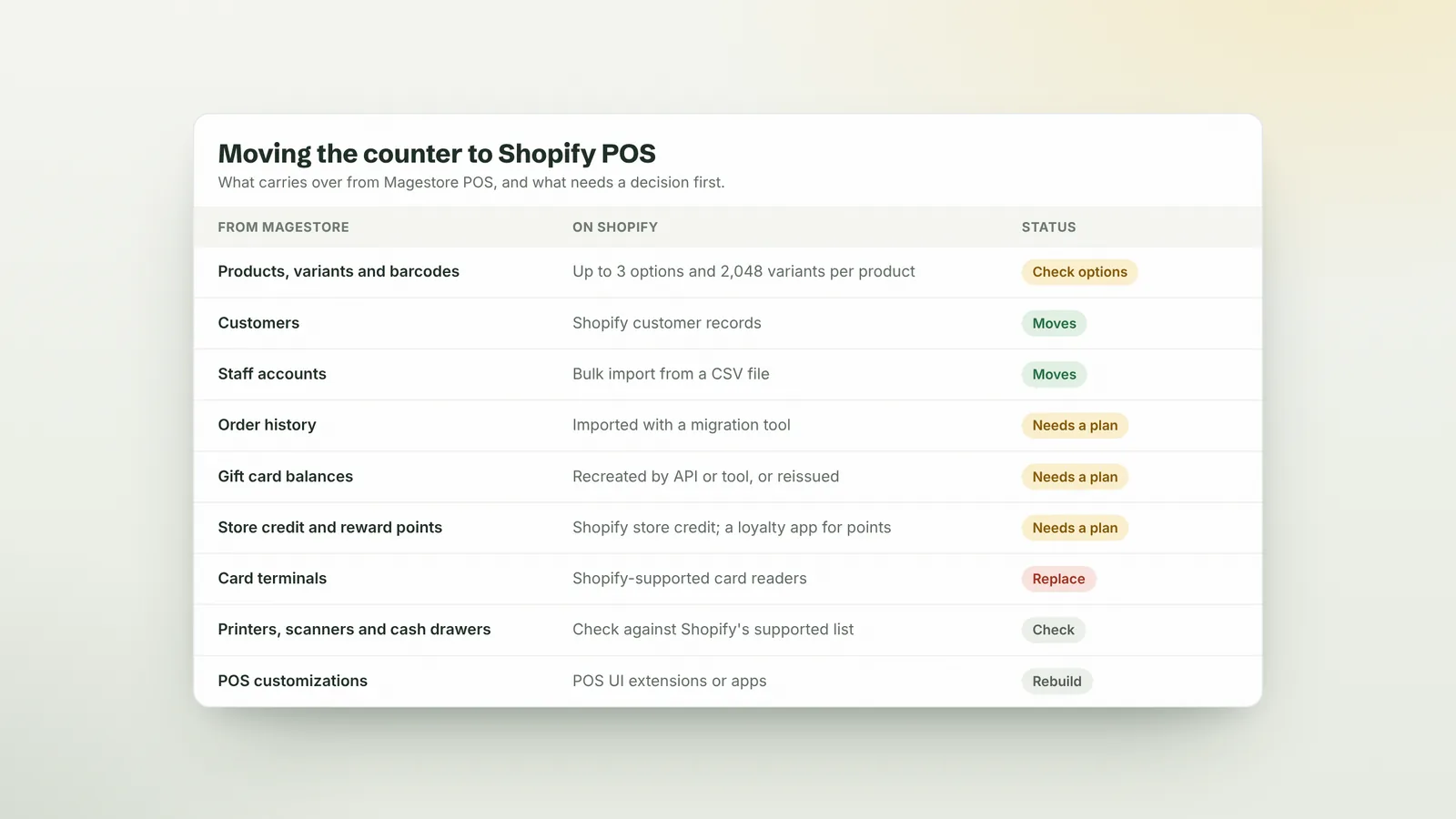
If you’re looking at Shopify POS as a Magestore alternative, remember that the register is the part of a store that customers and staff notice first if a move goes wrong. Most of the data comes across. A few things need a plan, and the card terminals change.
- List what Magestore does for you today. Include each plan feature you use, every customization and every connected system, such as an ERP or a loyalty program.
- Match each one on Shopify. Mark it as included, needs POS Pro, needs an app, or needs a custom extension. Shopify allows up to three options and 2,048 variants per product, so Magento products with more configurable attributes, bundles or custom options need remapping.
- Plan the balances. Gift card balances from Magestore are recreated on Shopify through a migration tool or the API, or reissued as new codes. Store credit and reward points need the same decision.
- Order your Shopify POS equipment early. Card terminals from your Magento processor won’t integrate with Shopify POS. Check your receipt printers, barcode scanners and cash drawers against Shopify’s supported hardware list.
- Set up Shopify POS and test. Staff can be added in bulk from a spreadsheet. Run test sales, returns and gift card redemptions at every location before the switch.
- Switch on a quiet day. Keep Magento readable for a while, so staff can look up older orders.
The counter is usually the last piece of a Magento to Shopify migration to go live, and the one where a missing gift card balance or a wrong stock count is felt straight away. Planning it with the catalog, customers and redirects, rather than after them, is what keeps the first day at the till quiet. Our guide on when to switch to Shopify POS covers hardware and switch day in more detail.
Questions retailers ask about Magestore POS and Shopify POS
Is Magestore POS better than Shopify POS?
If you’re staying on Magento, Magestore is among the most consistently recommended Magento POS systems and a strong fit. For a retailer weighing a move, Shopify POS usually comes out ahead: there’s no platform to host, patch or upgrade, no POS extension to keep compatible with each release, chat support runs 24/7 on every plan, and card payments and Tap to Pay are built in. Magestore’s Magento POS runs only on Magento, so the real choice is the platform, and if you’re planning a Magento to Shopify migration, Shopify POS is the natural fit for the counter.
How much does Magestore POS cost?
POS Lite is $69 a month and POS Simple is $89 a month plus $25 for each additional store, both for Magento Open Source. One-time licenses for POS Simple and POS Commerce, which also cover Adobe Commerce, are priced by quote and include a year of support and updates; after that, Magestore asks you to renew the warranty to keep receiving them, at a price it doesn’t publish. Magento itself adds recurring costs for hosting, security patches, upgrades and developer time. On Shopify you pay the plan plus Shopify POS Pro at $89 per location per month, and hosting, platform updates and 24/7 chat support are included.
Does Magestore POS work with Adobe Commerce and Hyvä?
Yes. The one-time licenses support Magento Open Source and Adobe Commerce; the monthly plans are for Magento Open Source. Magestore’s website says its POS works with Magento 2.4.9, Hyvä Theme and Hyvä Checkout. That compatibility has to be kept up: each Magento, Hyvä or Magestore update is one your team installs and tests together. On Shopify there’s no platform version to upgrade, because Shopify runs the platform and ships Shopify POS app updates every two weeks.
Can Shopify POS run on Windows or Mac?
No. Shopify POS runs on iOS and Android devices, not on Windows or Mac laptops and desktop computers. Magestore runs in a web browser, so it works on Windows and Mac computers as well as tablets.
Can we keep Magestore if we move to Shopify?
Magestore sells a separate POS system for Shopify, from $15 a month for one location or $50 per location a month for its Standard plan. It’s a different product from its Magento POS. It works with outside processors such as Stripe, Square, Authorize.net and Clover, runs in a browser on computers and tablets but not phones, and lists offline mode as coming soon.
Do we need Shopify Payments to use Shopify POS?
For integrated card payments in person, yes. You can run another processor’s card machine as an external terminal and record those sales as a custom payment, but nothing syncs. Cash works without Shopify Payments.
Thrivepine is a Shopify agency. Prices, plans and features are as Magestore, Shopify and Adobe published them on October 30, 2026, and review details come from Capterra. Check Magestore’s pricing page and Shopify’s POS pricing before you decide.
Sources
- Magestore: Magento POS, pricing, Adobe Commerce POS, about Magestore, premium support, Adobe Marketplace seller profile and best POS for Magento (Magestore blog)
- Adobe Commerce Marketplace: Magestore POS Lite
- Magestore: payment integrations, Stripe POS, offline sync, offline features and mobile POS
- Hyvä: Magestore POS x Hyvä
- Capterra: Magestore reviews
- Scandiweb: best POS systems for Magento
- Magestore: POS for Shopify
- Shopify: plans, POS pricing, multiple barcodes and Shopify hardware store
- Shopify Help Center: offline payments and what works offline
- Shopify Help Center: Tap to Pay on iPhone, Tap to Pay on Android, Tap & Chip reader, external card terminals, POS Go, migrating retail, Shopify Payments for POS, POS FAQ and contacting support
- Shopify Help Center: transitioning from Stocky, purchase orders, store credit in POS, POS subscription overview and variant limits
- Shopify: Verifone partnership, discontinued card readers
- Shopify Retail Roundup 2026, including July, August and September, and Shopify Editions Fall ’26
- Shopify Help Center: Shopify Tax pricing
- Adobe: released versions, lifecycle policy and 2026 security bulletins for July, August, September 7 hotfix, September and October
- Stripe Terminal pricing